If you use WordPress, SEO is still one of the most important things to focus on in 2025.
Search engines are constantly changing, but one thing stays the same – audiences use Google every day to find answers, products, and services.
If your site isn’t optimized, you’re missing out on free traffic, trust, and visibility. With so many websites competing for attention, good WordPress SEO helps you show up at the right time, in front of the right audience.
Instead of giving you the usual checklist, I’ll walk you through a more practical, long-term approach to WordPress SEO in this post.
So, without any further ado, let’s get started.
1 SEO Fundamentals for WordPress
Before you start optimizing your WordPress site, it helps to understand a few basics. These are the foundations that guide every SEO decision you make.
1.1 How Search Engines Work
Search engines follow three main steps: crawl, index, and rank.
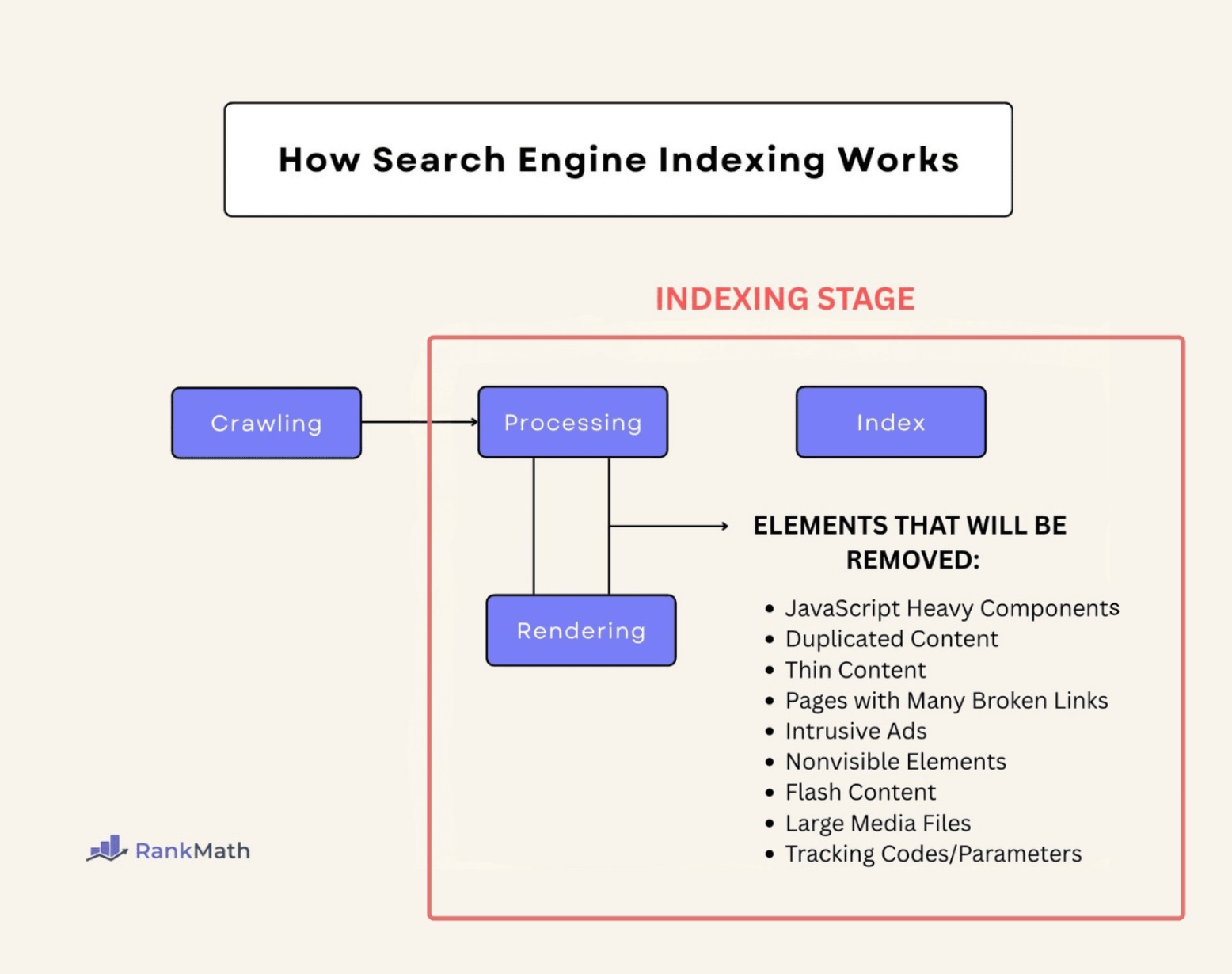
- Crawl: Search bots visit your site and move through your pages.
Example: If a page has broken links or is blocked in robots.txt, the bot might miss it. - Index: After crawling, the bot saves your page in Google’s database so it can show it in search results. For instance, if your page has thin content or is marked “noindex,” Google may skip it.
- Rank: Google decides where your page should appear in search results based on quality, relevance, and many other factors.
Example: A helpful article with a clear structure and good internal links usually ranks higher than a messy, shallow page.
When you understand these steps, you can build your site in a way that helps search engines do their job easily.
1.2 Keyword Research
Keyword research helps you understand what topics your audience is searching for. Instead of guessing, you use data to decide what to write about.
Focus on Long-Tail & Semantic Keywords
Long-tail keywords are longer and more specific. They bring in visitors who already know what they want.
- best shoes → very broad
- best running shoes for flat feet → long-tail, easier to rank
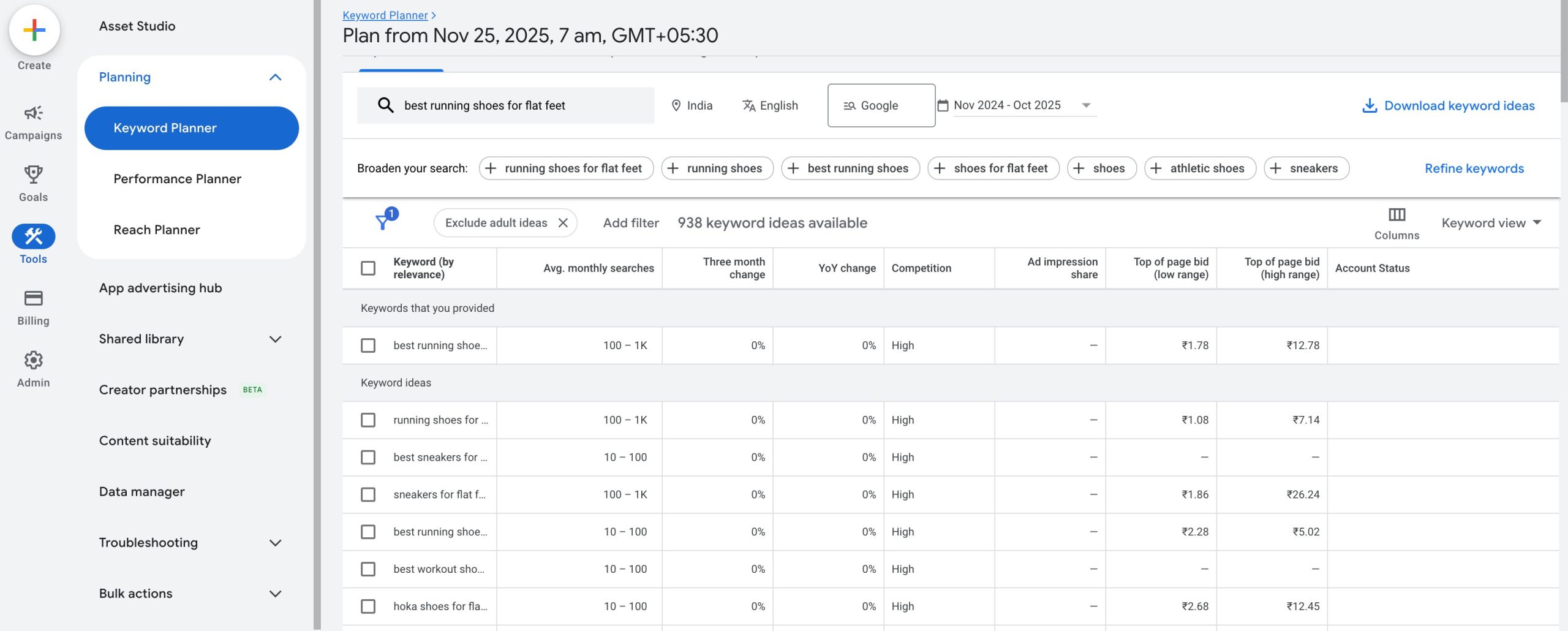
You can find long-tail keywords using Google Keyword Planner. Once you’re in, select the option to Discover new keywords. This feature allows you to input seed keywords, which are general terms related to your industry or topic.
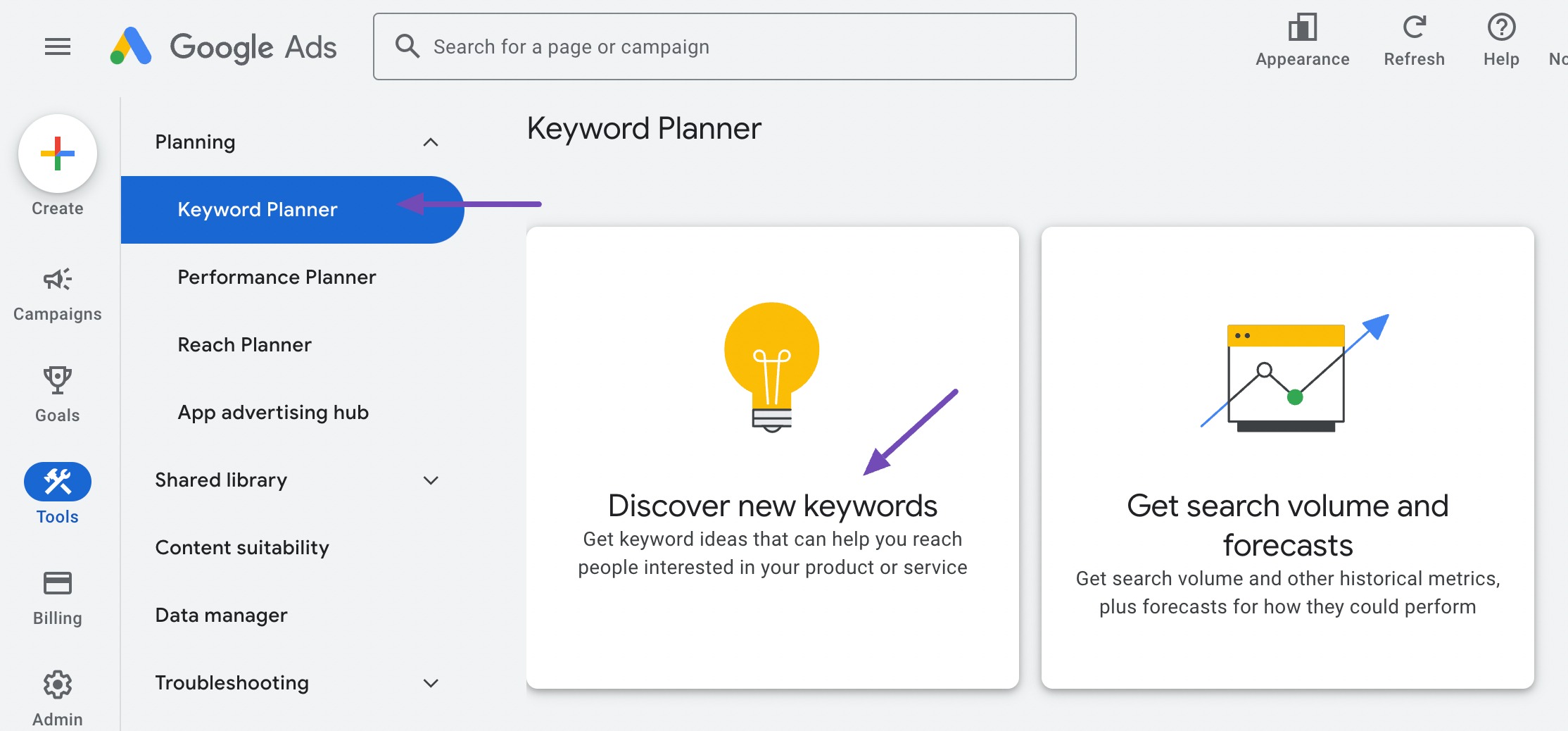
Google Keyword Planner will then generate a list of related keywords, including search volume, competition level, and other relevant information, for each term.
Semantic keywords are related words and phrases that give search engines more context.
For instance, if your main keyword is WordPress SEO, semantic keywords can include XML sitemap, SEO plugins, internal links, etc.
Using these naturally in your content helps search engines understand your topic better.
Refer to our dedicated tutorial on keyword research to learn the basics, tools and strategies to grow your traffic.
Create Topic Clusters for Topical Authority
A topic cluster means you choose a broad topic, write one main article about it, and support it with smaller related articles.
For instance:
- Main article: WordPress SEO Guide
- Cluster articles: image SEO, Schema markup, page speed, internal links
When all these articles link to each other, Google sees your site as a strong source on that subject.
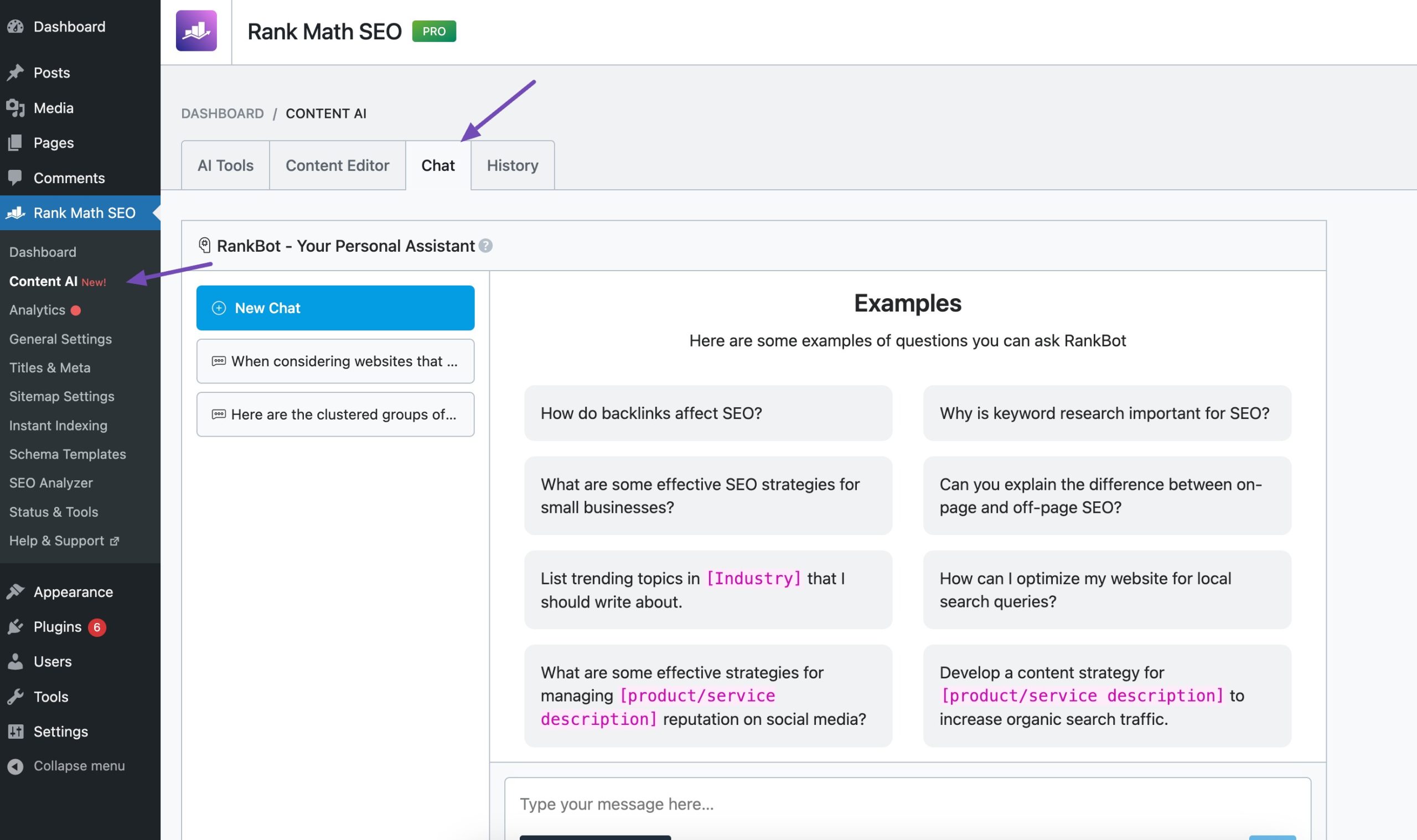
Rank Math’s RankBot helps to generate keyword clusters with ease. To do so, navigate to Rank Math SEO → Content AI → Chat from your WordPress dashboard after enabling the Content AI module.
In the RankBot input field, you can type a prompt like this to generate keyword clusters:
Cluster the following list of keywords into groups based on their topic. Each group should contain keywords that are closely related to each other and have the same search intent. Here is the list of keywords: [keywords]
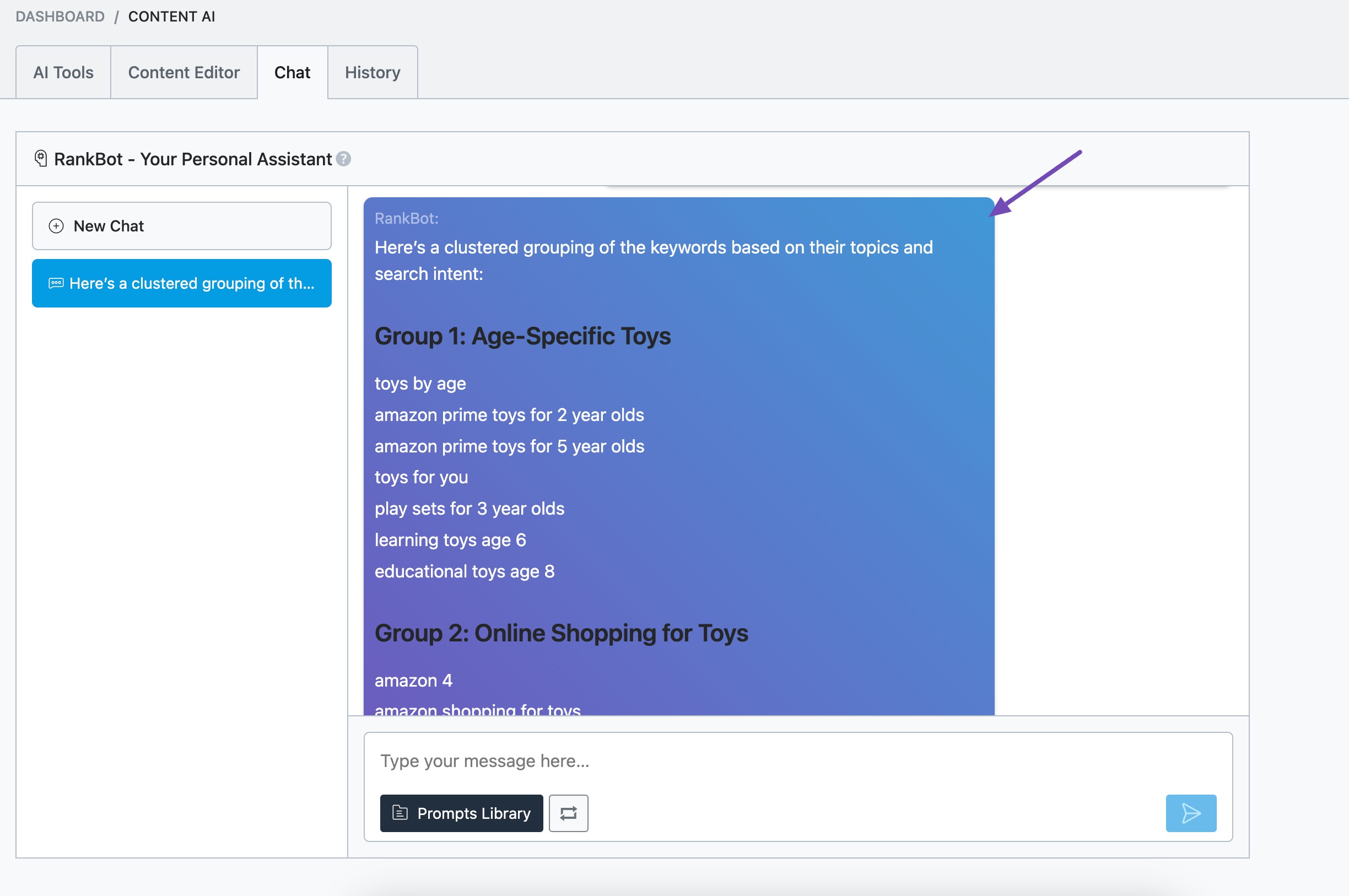
Refer to our dedicated tutorial on topic clusters and improve visibility for a wide range of keywords.
1.3 Search Intent & User Journey
Search intent is the reason behind a search. If you match the intent correctly, your page is more likely to rank.
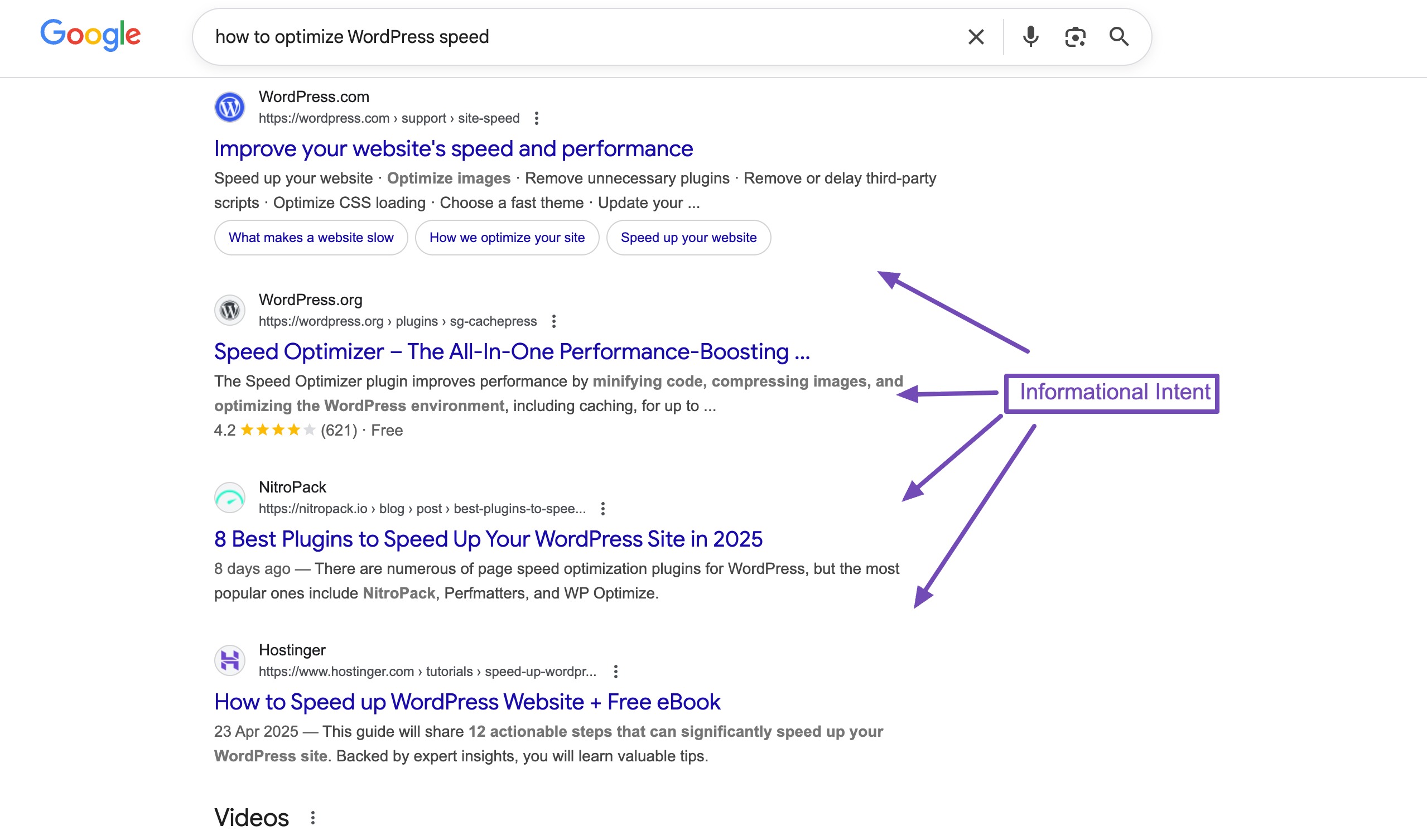
Types of Intent
- Informational: The searcher wants to learn something.
Example: how to optimize WordPress speed - Transactional: The searcher wants to buy something.
Example: best WordPress hosting plans - Navigational: The searcher wants to reach a specific website.
Example: WordPress login page
When you understand this, you can create content that matches what the searcher expects.
Reflecting Intent in Titles, Headings & Content
Your page should clearly show what it offers.
- If the intent is informational, your title should be: How to Improve WordPress Speed Step by Step
- If the intent is transactional, your title should be: Best WordPress Hosting Services Compared
Your headings and content should follow the same intent. If your audience wants a tutorial, give them steps. If they want a comparison, give them features, pros, cons, and pricing.
You can check the search intent in Rank Math from the individual post/page editor or in bulk. The Show Intent label beside your primary keyword instantly displays its intent and helps you to optimize your content effectively. Simply drag another keyword to the first position to check its intent.
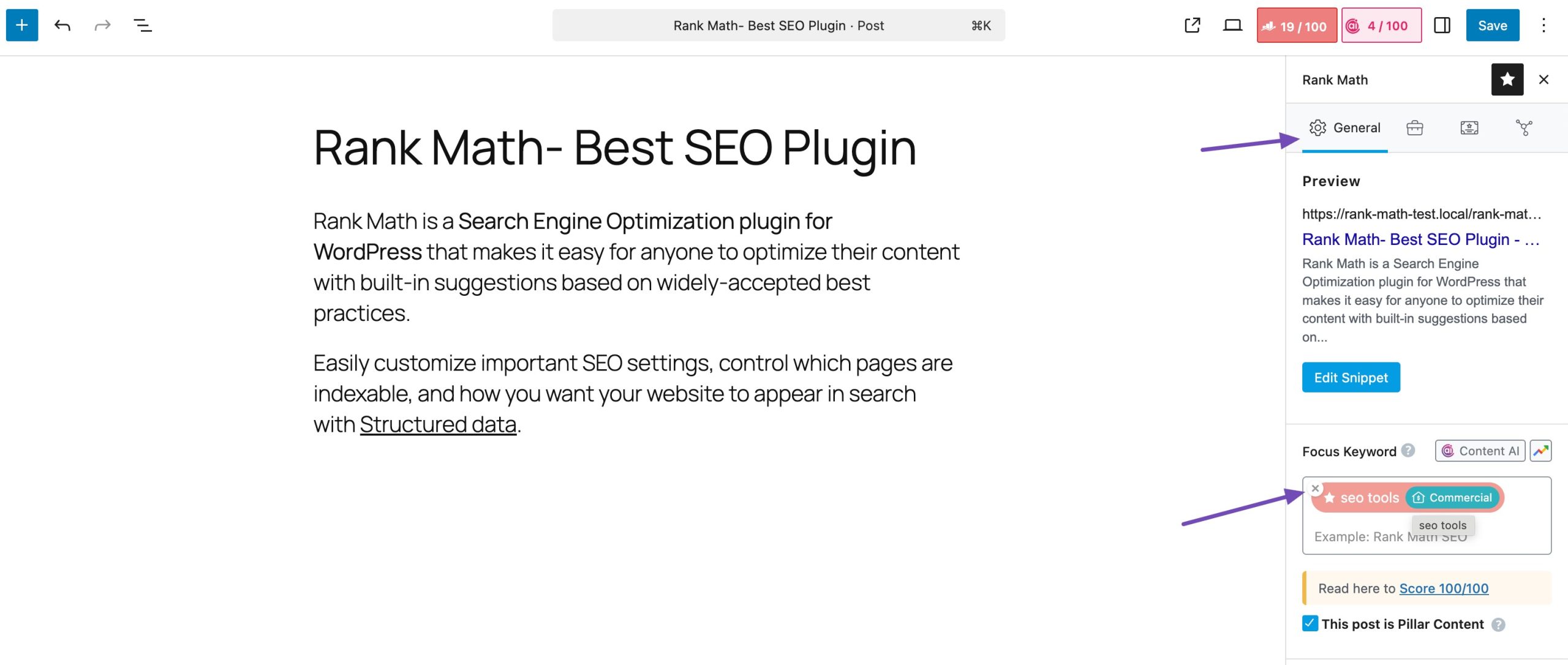
Refer to our dedicated tutorial on search intent and shape your content to meet the audience’s needs.
2 Technical SEO Best Practices
Technical SEO makes sure your WordPress site is easy for search engines to crawl, understand, and rank. Even if you write great content, a weak technical setup can hold your site back.
2.1 Choose a Fast, SEO-Friendly WordPress Theme
Your theme affects your site speed, layout, and overall performance. When you pick a theme, choose one that is:
- Lightweight: Themes like GeneratePress, Astra, and Neve load fast because they don’t come with unnecessary code.
- Cleanly coded: This helps search engines read your site without issues.
- Mobile responsive: Google ranks mobile-friendly sites higher.
If your current theme loads slowly or has too many animations, switching to a lighter theme can instantly improve your site speed.
2.2 Secure & Reliable Hosting
Your hosting provider plays a big role in SEO. If your site is slow or keeps going down, Google may reduce your rankings.
A good host should offer:
- Fast servers
- Stable uptime
- Security features
- Quick support
Every time your site goes offline, search engines may skip crawling or indexing. One.com is a well-known hosting provider with an easy-to-use dashboard and budget-friendly hosting plans.
It offers useful features like web hosting, automatic updates, strong security, and dependable uptime. You also get fast loading speeds and flexible hosting options that work for both small and large websites.

If you’re hosting your site on One.com, Rank Math SEO, one of the most powerful SEO plugins, is usually installed automatically. If you don’t see it in your plugins list, you can simply install and activate it yourself in a few clicks.
2.3 SSL / HTTPS for Google Trust & Rankings
Google expects every site to use HTTPS.
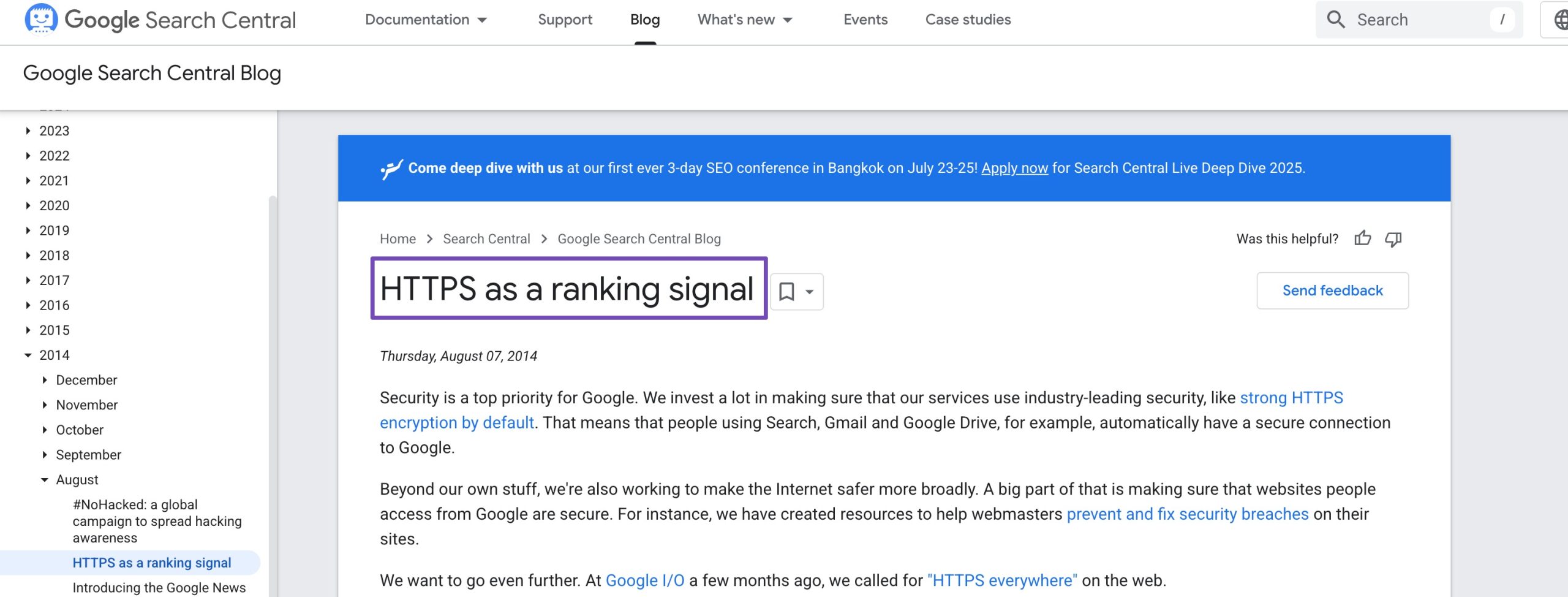
When your site has an SSL certificate, visitors see the padlock icon in the address bar.
Why this matters:
- It protects user data
- It builds trust
- Google treats HTTPS as a ranking factor
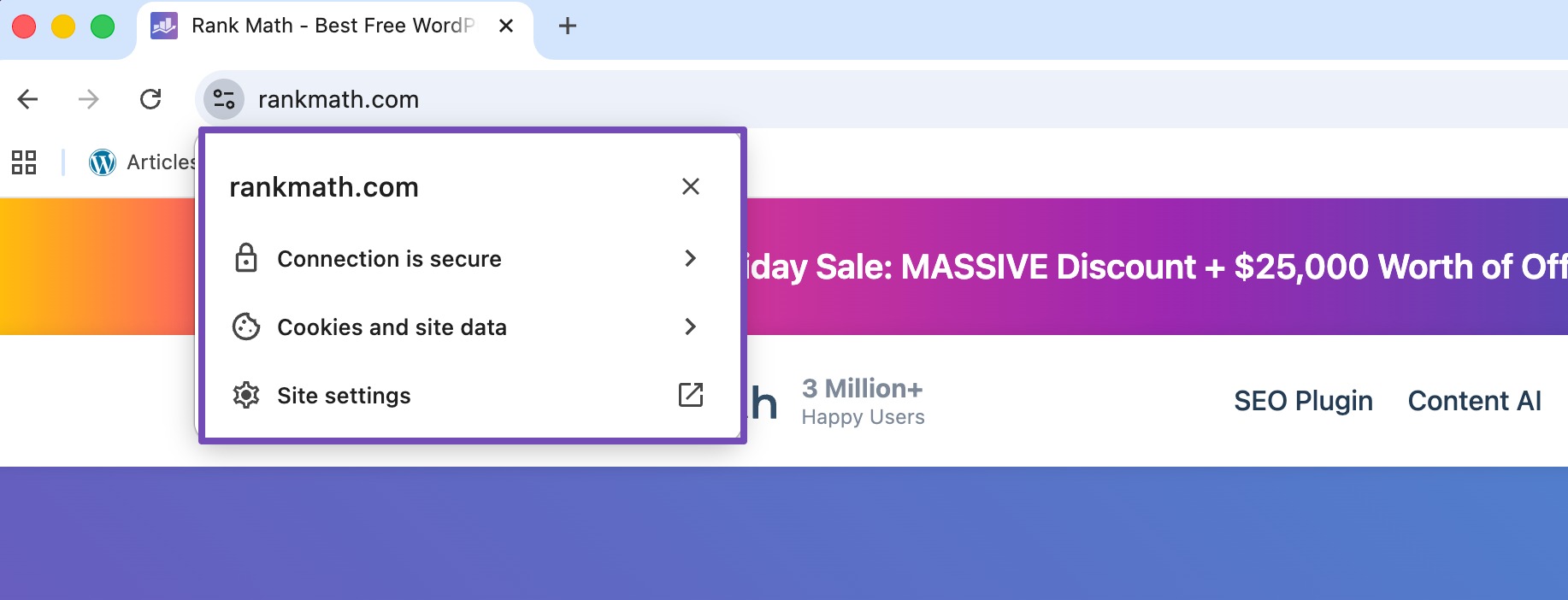
If your site still shows “Not Secure,” you may lose rankings and visitors. Most hosts provide free SSL, and you should enable it right away.
2.4 Sitemap & Robots.txt
A sitemap tells search engines which pages to crawl and helps Google find your important pages faster, especially new blog posts or updated content.
With Rank Math SEO, you can easily create and manage XML sitemaps right inside your WordPress dashboard.
Once Rank Math is active, the plugin automatically generates and updates your sitemap to match your content. This includes posts, pages, categories, images, and even custom post types. You also have full control, and you can decide which pages or sections to include or exclude with just a few clicks.
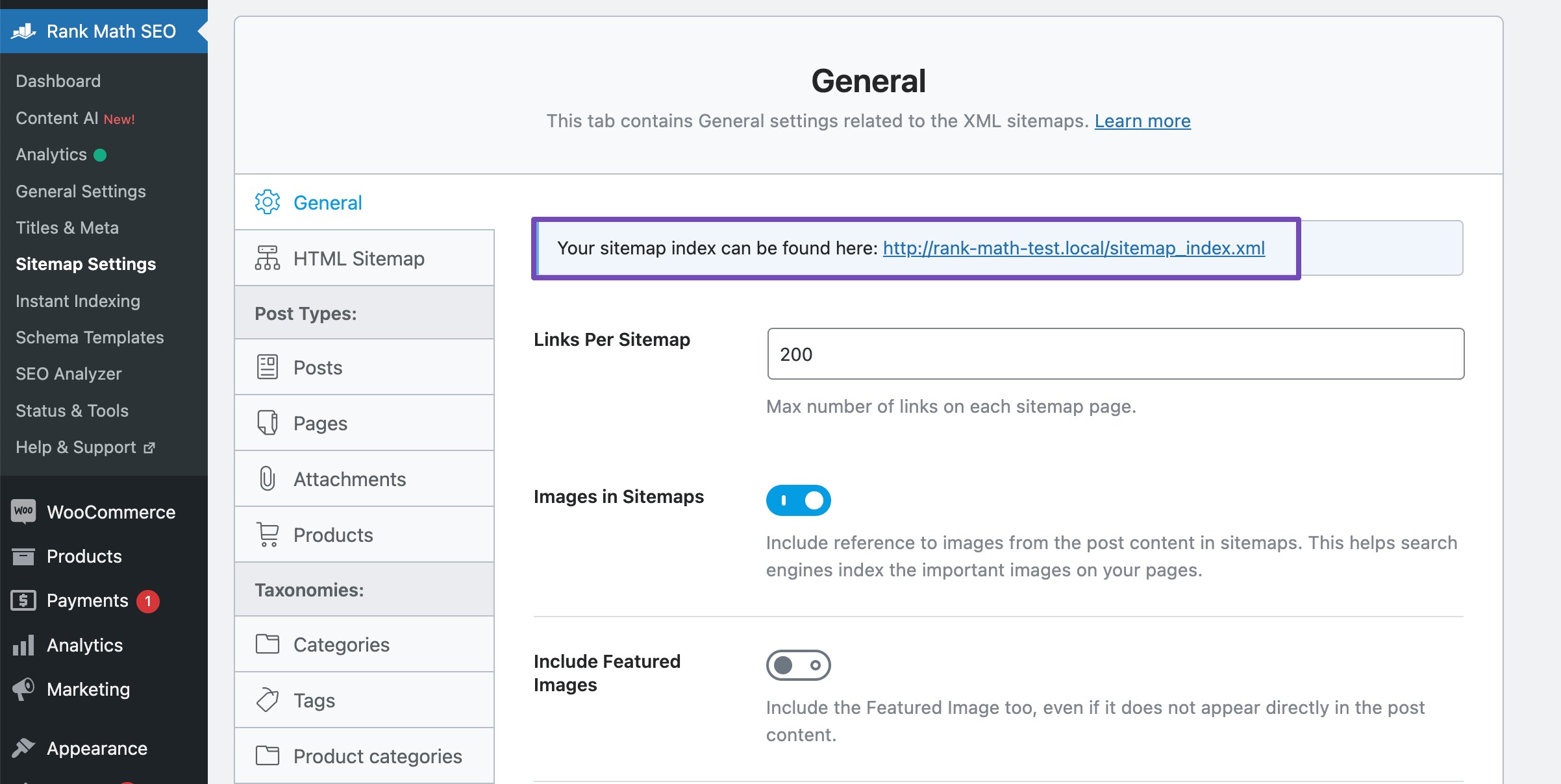
You can set up sitemap settings by navigating to Rank Math SEO from your WordPress dashboard and enabling the Sitemap module, as shown below.
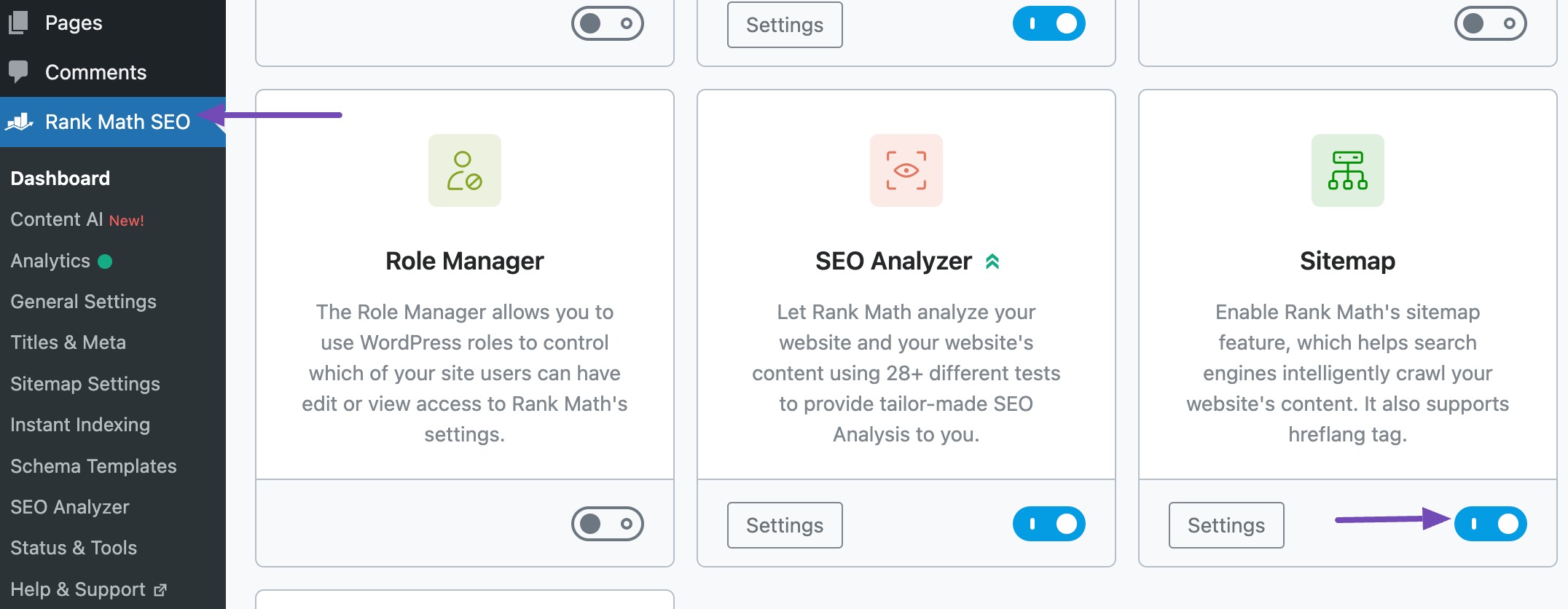
To view your XML sitemap, navigate to Rank Math SEO → Sitemap Settings from your WordPress dashboard, where the URL to your XML sitemap will be displayed at the top of the page.
A Robots.txt file guides search bots on what to crawl and what to avoid.
You can use robots.txt to:
- Block admin pages
- Prevent bots from crawling duplicate content
- Make crawling more efficient
You can easily edit your robots.txt file in Rank Math. To do so, navigate to Rank Math SEO → General Settings → Edit robots.txt from your WordPress dashboard, as shown below.
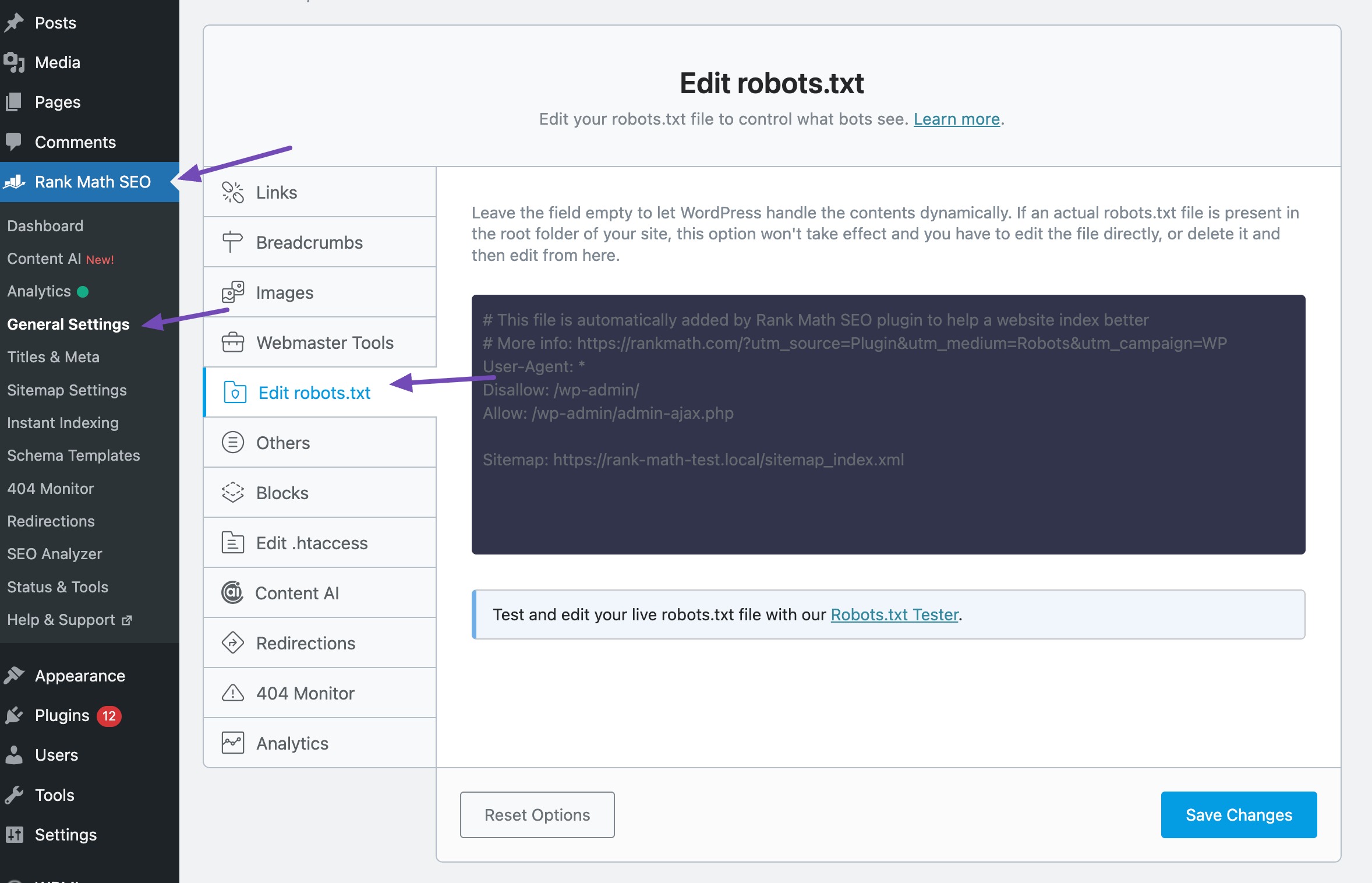
You can verify your changes with the help of our external tool.
But if you are a Rank Math PRO user, the robots.txt file will have a more advanced editor and tester, as shown below.

2.5 Crawlability & Site Structure
Your site should be easy for both visitors and search engines to navigate. A clear structure helps Google crawl your pages correctly.
Logical Hierarchy
Organize content by categories and sub-categories.
For instance:
- Main Category: WordPress SEO
- Sub-Category: Technical SEO
- Post: How to Create a Sitemap in WordPress
This makes your site predictable and easier to understand.
Breadcrumbs show the path a visitor takes to reach the current page.
For instance: Home → Blog → SEO → Technical SEO
They improve navigation and also help search engines understand your page’s position on your site.
You can easily configure breadcrumbs in Rank Math.
To do so, navigate to WordPress Dashboard → Rank Math SEO. Then, turn on the Schema module. This allows Rank Math to add the Breadcrumb Schema for the breadcrumbs.

Next, you can configure your breadcrumb settings. Go to Rank Math SEO → General Settings → Breadcrumbs. If you don’t see the Breadcrumbs settings, make sure you’ve switched Rank Math to Advanced Mode.
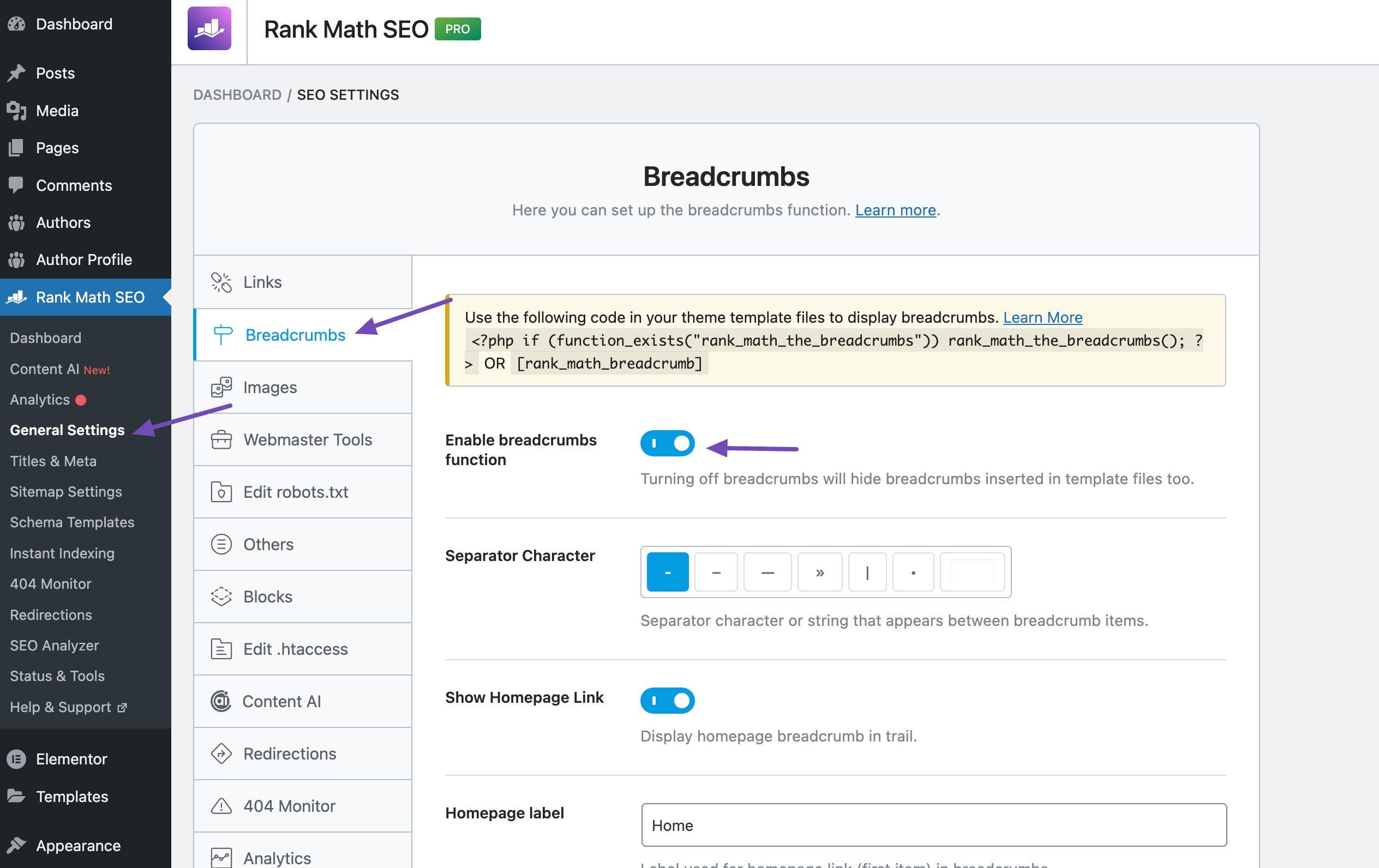
Once you enable the breadcrumbs function, all the breadcrumb settings will appear on the screen. You can then configure the settings as per your choice.
2.6 Schema Markup & Structured Data
Schema helps search engines understand your content better. It also helps you qualify for rich results.
Common Schema Types
- Article: For blog posts
- FAQ: For pages answering multiple questions
- How-To: For step-by-step guides
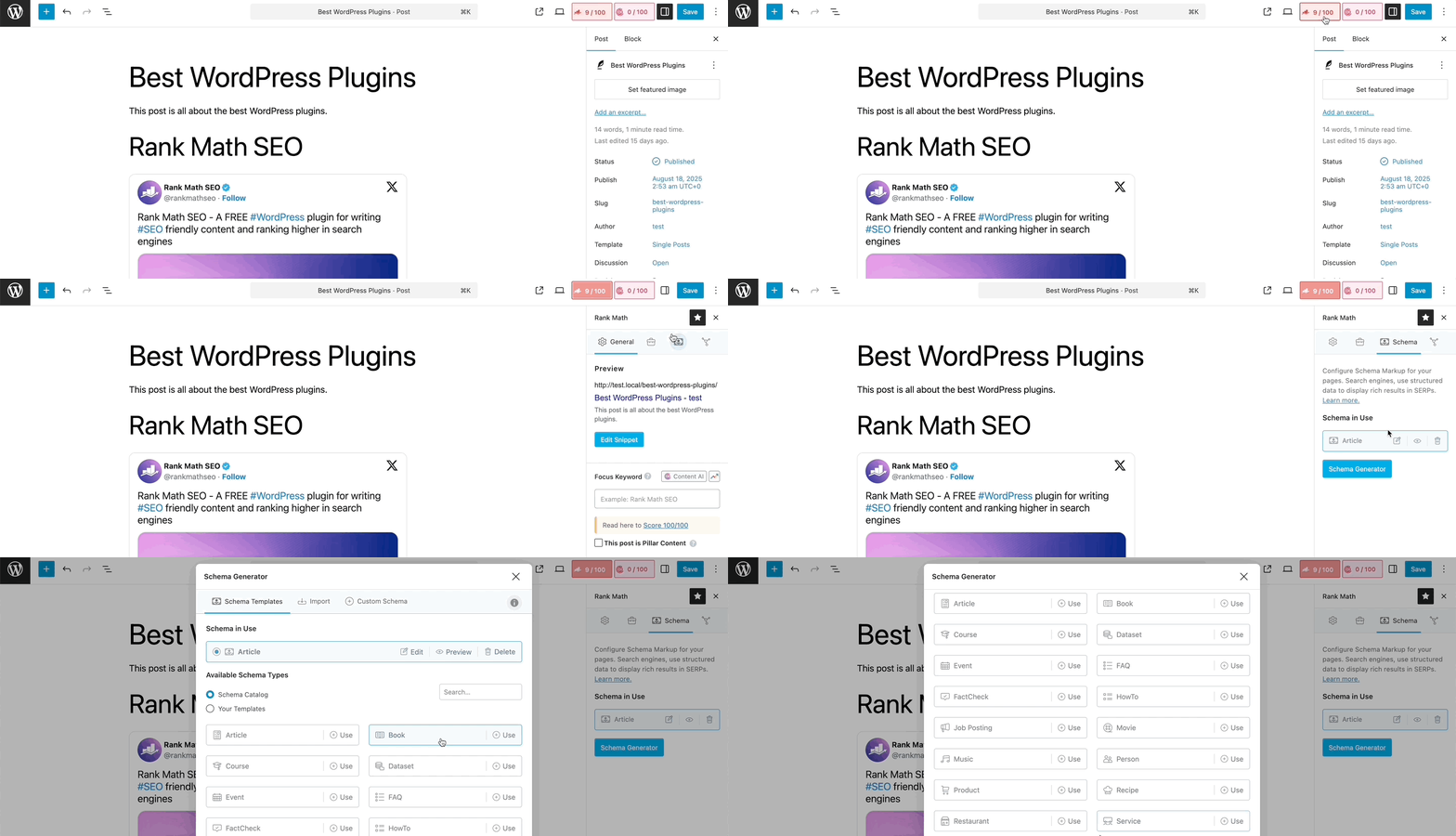
Rank Math provides a Schema Markup module that lets you add structured data to your content. This feature supports various Schema types, including Article, Product, Recipe, and more, enabling rich snippets in search results.
When you edit individual posts or pages in the WordPress Block (Gutenberg) editor, simply open the Schema options, as shown below.
If you’re not sure which Schema to use, refer to our dedicated tutorial on choosing the right Schema for your content.
Testing Schema
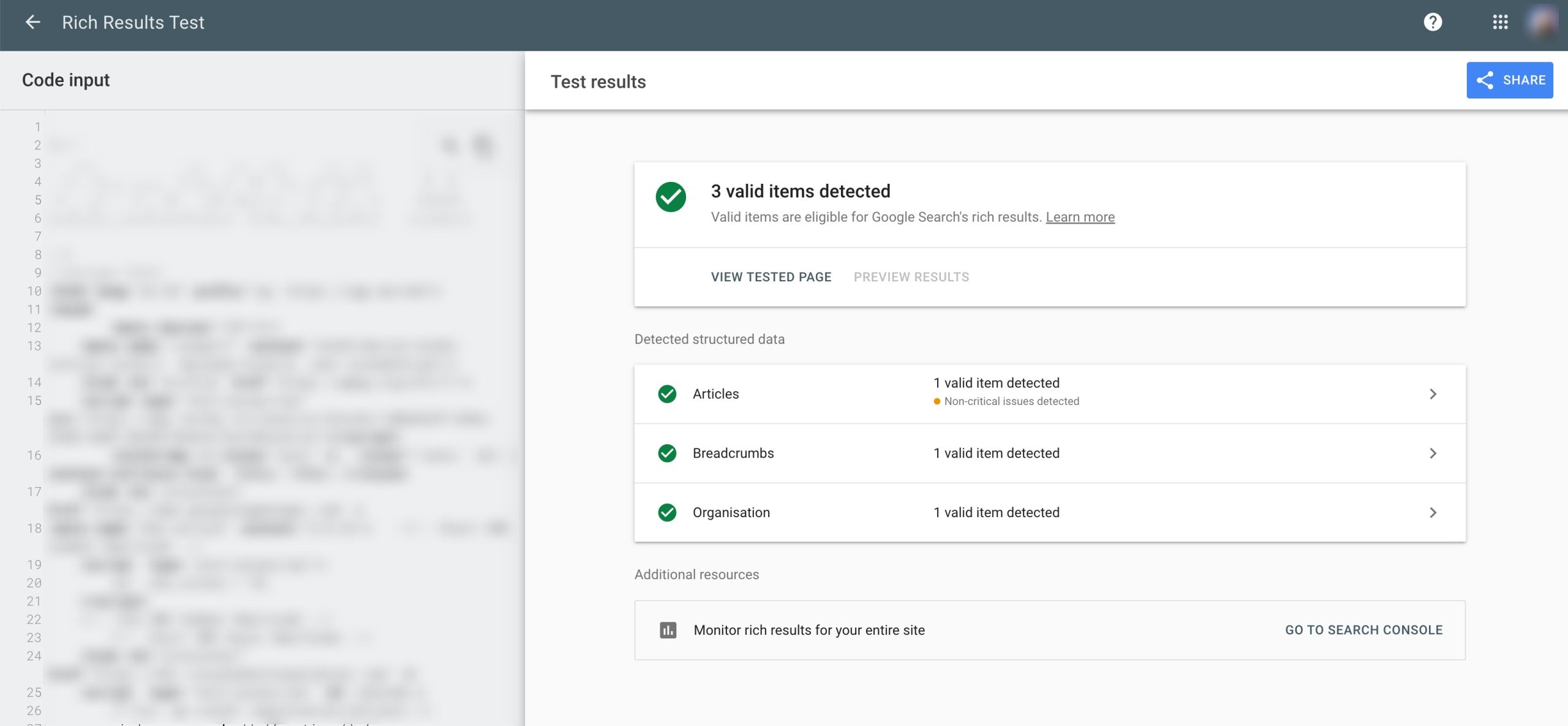
After adding the Schema, use Google’s Rich Results Test to make sure everything works.
Just enter your URL, and it will show if your structured data is valid.
You can also test if your Schema is set up correctly in Rank Math.
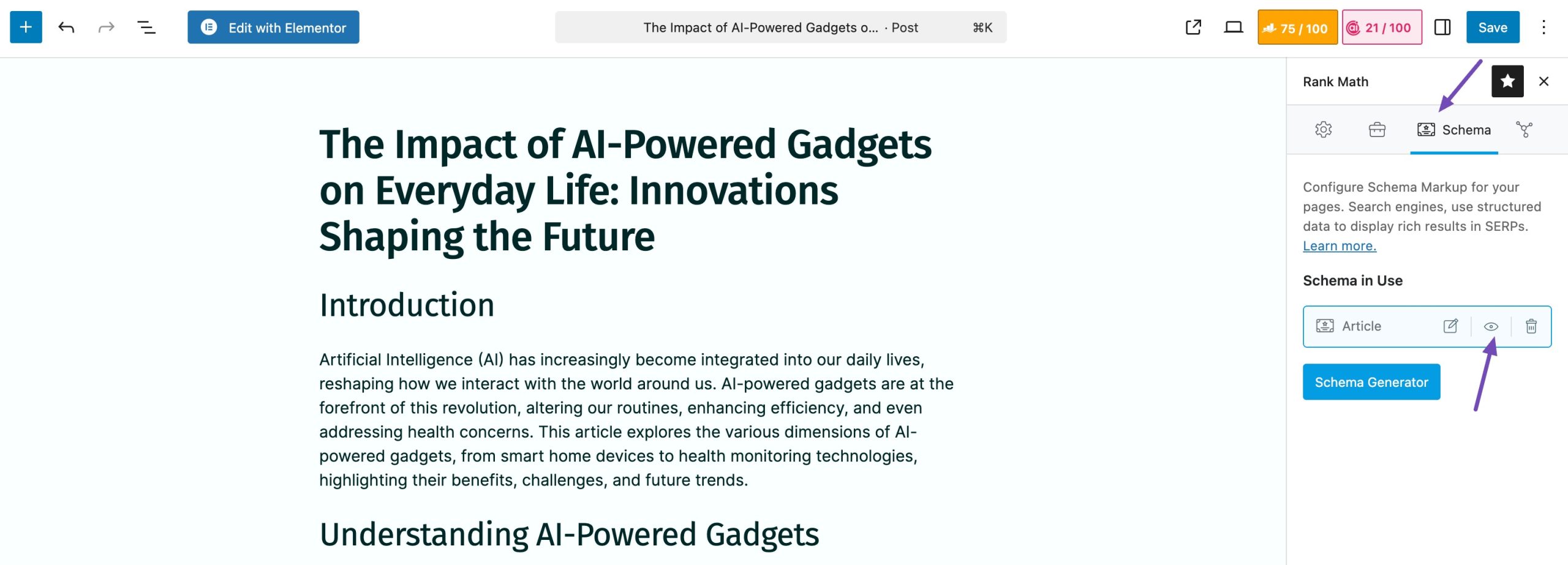
To do so, navigate to your post or page editor and scroll down to the Rank Math meta box. Then, navigate to the Schema tab and choose the Schema type you’ve added.
After that, click on the Code Validation icon, as shown below.
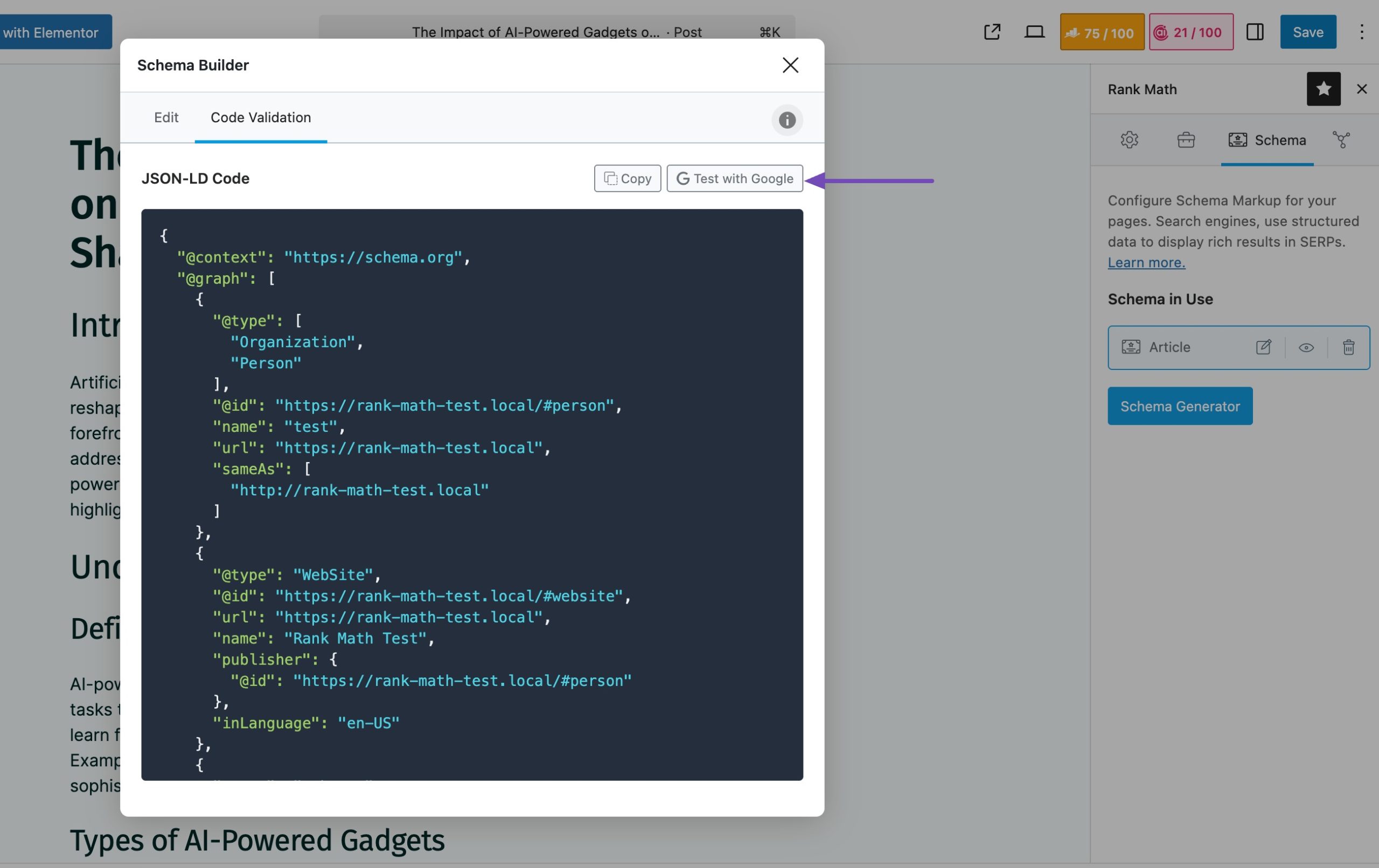
Here, you can preview the JSON-LD code. Click the Test with Google button, and you’ll be taken directly to the Google Rich Results Test with your code automatically added.
3 On-Page SEO Best Practices
On-page SEO helps search engines understand your content and helps visitors read it easily. When you get these basics right, your pages become more helpful and more likely to rank.
3.1 Title Tags & Meta Descriptions
Your title tag is the first thing a visitor sees in search results, and your meta description explains what the page is about. You want both to be clear, simple, and relevant.

How to write a good title:
- Include your main keyword
- Keep it natural
- Make it clear what the reader will get
How to write a good meta description:
- Summarize your page in one or two sentences
- Add your main keyword naturally
- Tell the reader what they will learn
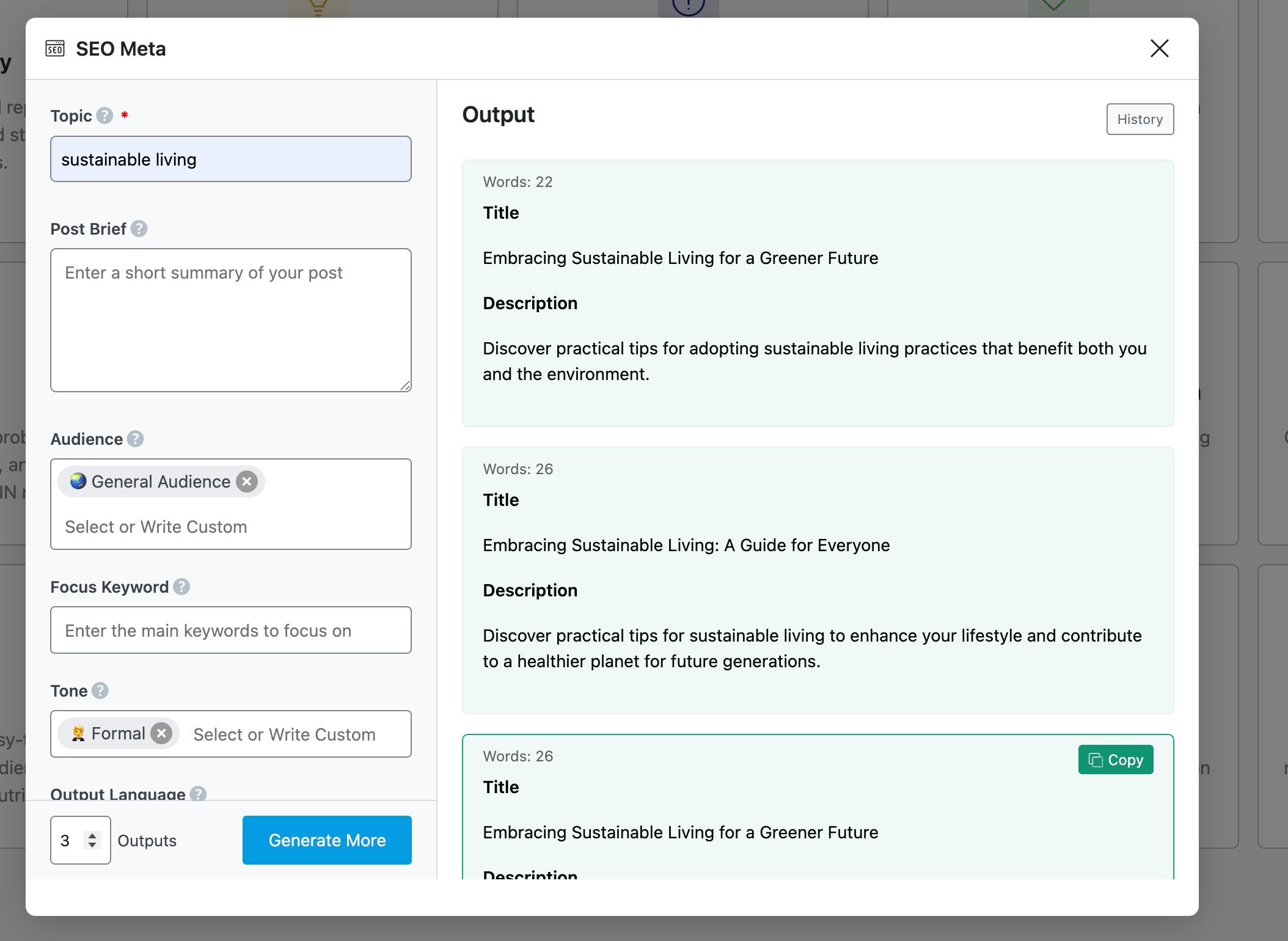
You can use our SEO Meta AI tool to write good titles and meta descriptions. The primary advantage of using AI tools is time savings. In fact, 71% of users identify it as their top benefit.
Add the topic of your choice, and our tool will generate the optimized title and description for your posts and pages.
3.2 URL / Permalink Optimization
Your URL should be short, clean, and easy to understand. It helps both visitors and search engines.
Tips for better URLs:
- Use lowercase letters
- Add your main keyword
- Avoid long, messy URLs
For instance, you can write this URL example.com/2025/04/the-best-guide-for-wordpress-seo-you-should-read-now as example.com/wordpress-seo-guide
Short URLs look more trustworthy and are easier to read and share.
Refer to our dedicated tutorial to create SEO-friendly URLs.
3.3 Heading Structure (H1, H2, H3…)
Headings help you organize your content. They inform the reader and search engines what each section is about.
- Use H1 for the page title
- Use H2 for main sections
- Use H3 for smaller sections inside an H2
For instance:
H1: WordPress SEO Guide
→ H2: Technical SEO
→→ H3: How to Create a Sitemap
→→ H3: Fixing Crawl Errors
A clean heading structure makes your content easier to follow and helps search engines understand your topic.
3.4 Internal & External Linking Strategy
Links are powerful when used correctly.
Internal Linking
Internal links help you connect related pages on your site. This creates small topic groups that show search engines you understand a subject.
For instance, if you write about WordPress SEO, link to your posts on image SEO, Schema markup, and WordPress speed.
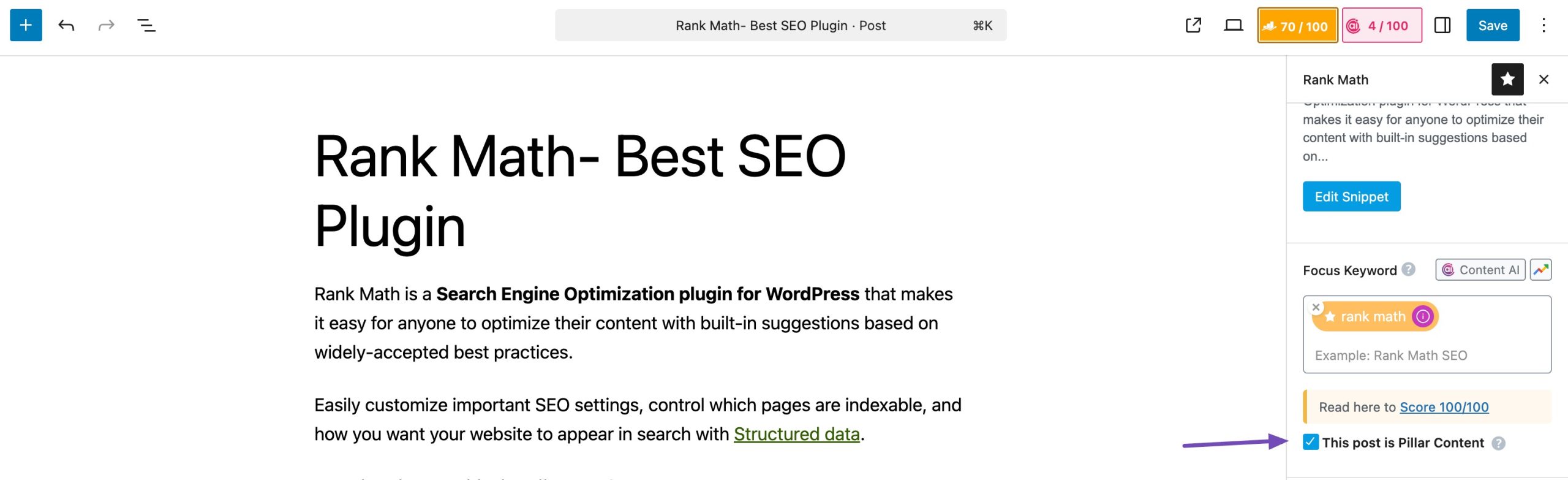
If you’re using Rank Math, you can mark articles as Pillar Content. This tells Rank Math these posts are important, evergreen resources. It will then help you create internal links pointing to these pages so they get more attention.
Use descriptive anchor text. Descriptive, keyword-rich anchor text makes your content more user-friendly and tells search engines what the linked page is about, without sounding spammy.
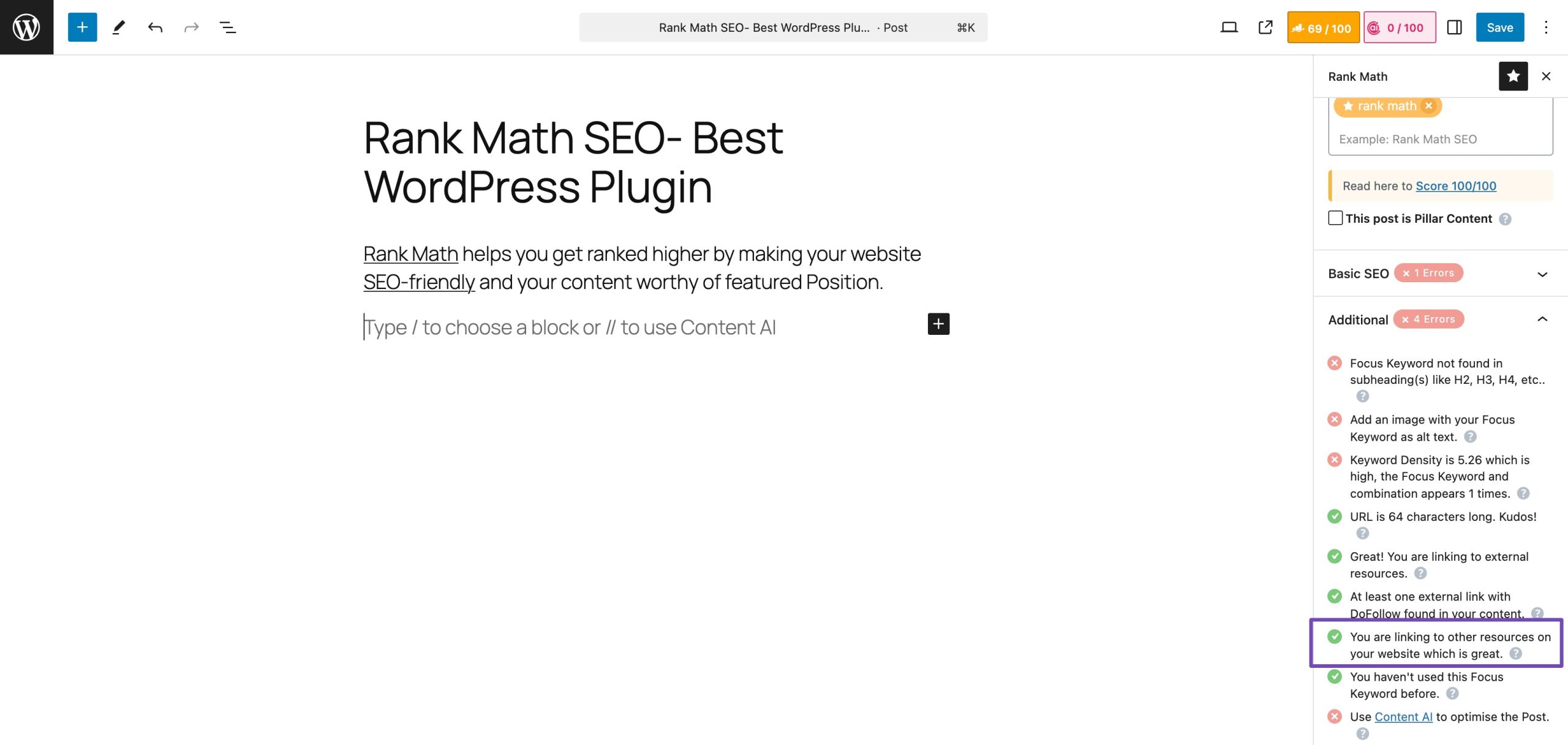
Rank Math can even alert you if a page has no internal links, so you never miss an opportunity to add links to your content.
External Linking
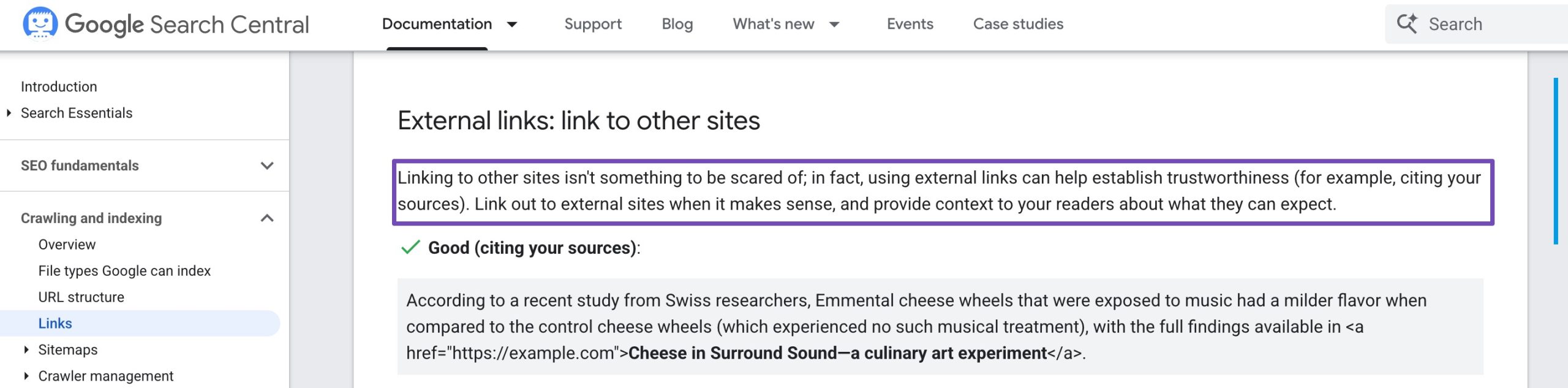
Linking to trusted sources adds credibility to your content.
Example:
If you explain page speed, you can link to official resources like Google PageSpeed Insights.
This shows that your content is well-researched and reliable.
3.5 Content Optimization & Readability
Even the best SEO won’t help if your content is hard to read. Write in a way that feels natural and easy to follow.
Tips for readability:
- Use short paragraphs
- Add lists and bullet points
- Use active voice
- Break long sections with headings
Rank Math’s Content AI is built specifically to use AI for your content creation workflow within WordPress. Content AI is a suite of over 40 AI writing tools that help you create engaging and SEO-friendly content faster and easier than ever before.
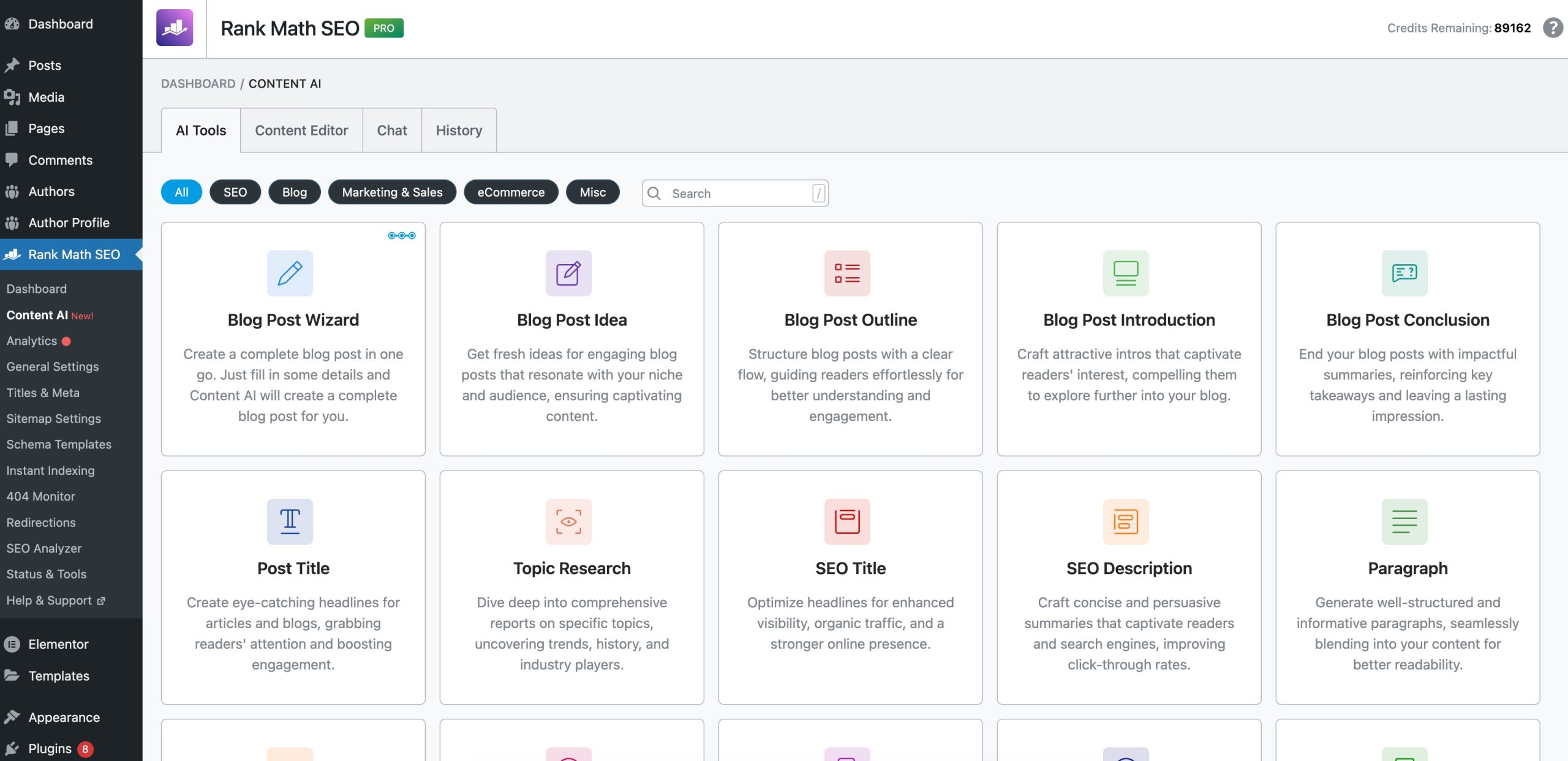
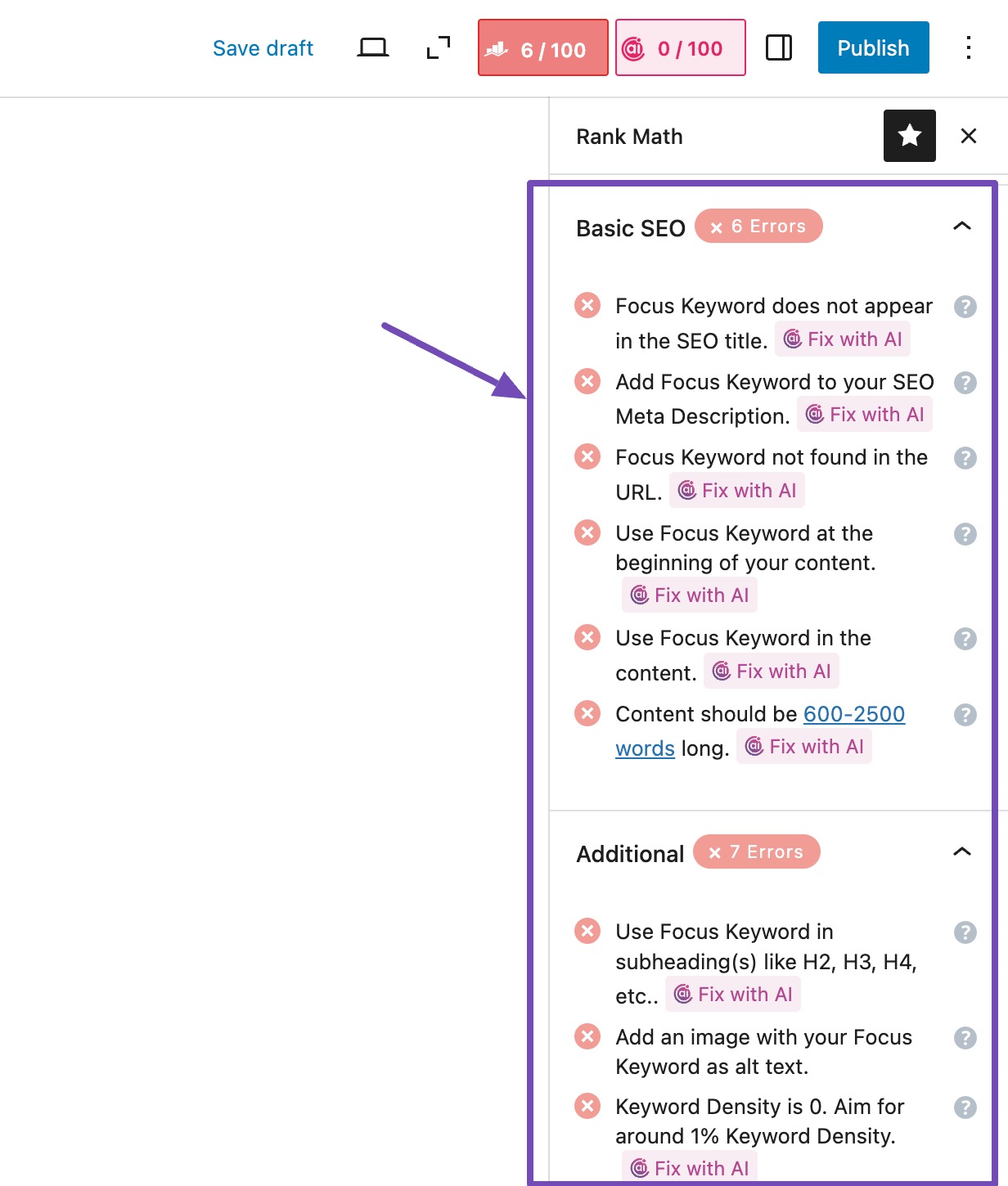
Not only this, you can fix SEO tests directly within the Rank Math meta box, saving you time while ensuring your content is fully optimized.
In your post-editing screen, review the SEO tests, and for any failed tests, you’ll notice a Fix with AI button marked with the Content AI logo. This button, powered by Content AI, allows you to resolve failed SEO tests with just a single click automatically.
Update Evergreen Content
Evergreen content is the type of content that stays useful over time, tutorials, how-to guides, checklists, reviews, and similar posts.
But even evergreen content needs updates to stay accurate and relevant. When you refresh it, you show search engines that your page is still active and trustworthy.
If you have older guides or tutorials, refresh them with updated steps, new screenshots, or recent data.
For instance, if you wrote a guide in 2021, update it for 2025 by checking new WordPress versions, plugin updates, or changed Google features.
Optimizing your images and videos helps your WordPress site load faster and gives search engines clearer information about your content, making it easier for you to rank better without extra effort.
4.1 Image Optimization
When you upload images to your site, you want them to look good and load fast.
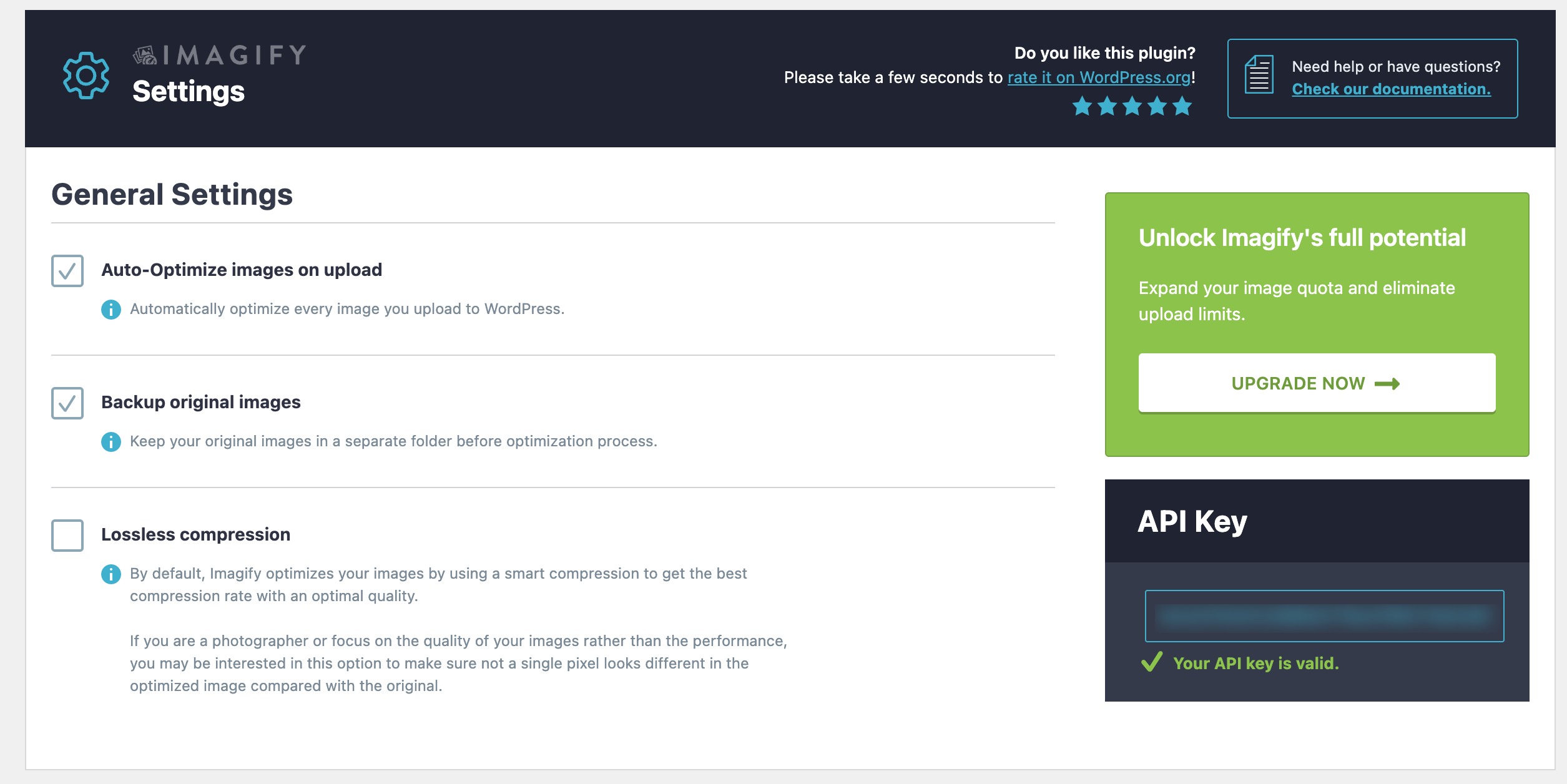
One simple habit that helps is compressing images before you upload them. Tools like Imagify can reduce the file size without hurting quality. It’s something I do for every image on my site because it keeps pages quick.
You should also rename your files in a descriptive way. Instead of: IMG_4482.jpg use chocolate-cake-recipe.jpg
This makes it easier for search engines to understand what the image shows.
Next, add alt text that describes the image clearly and naturally. If your page targets a keyword, you can include it in the alt text only when it actually fits what the image shows.
Rank Math actually makes it possible to automate the alt text process. Missing alt attributes can automatically be added using various variables, such as their file name, etc.
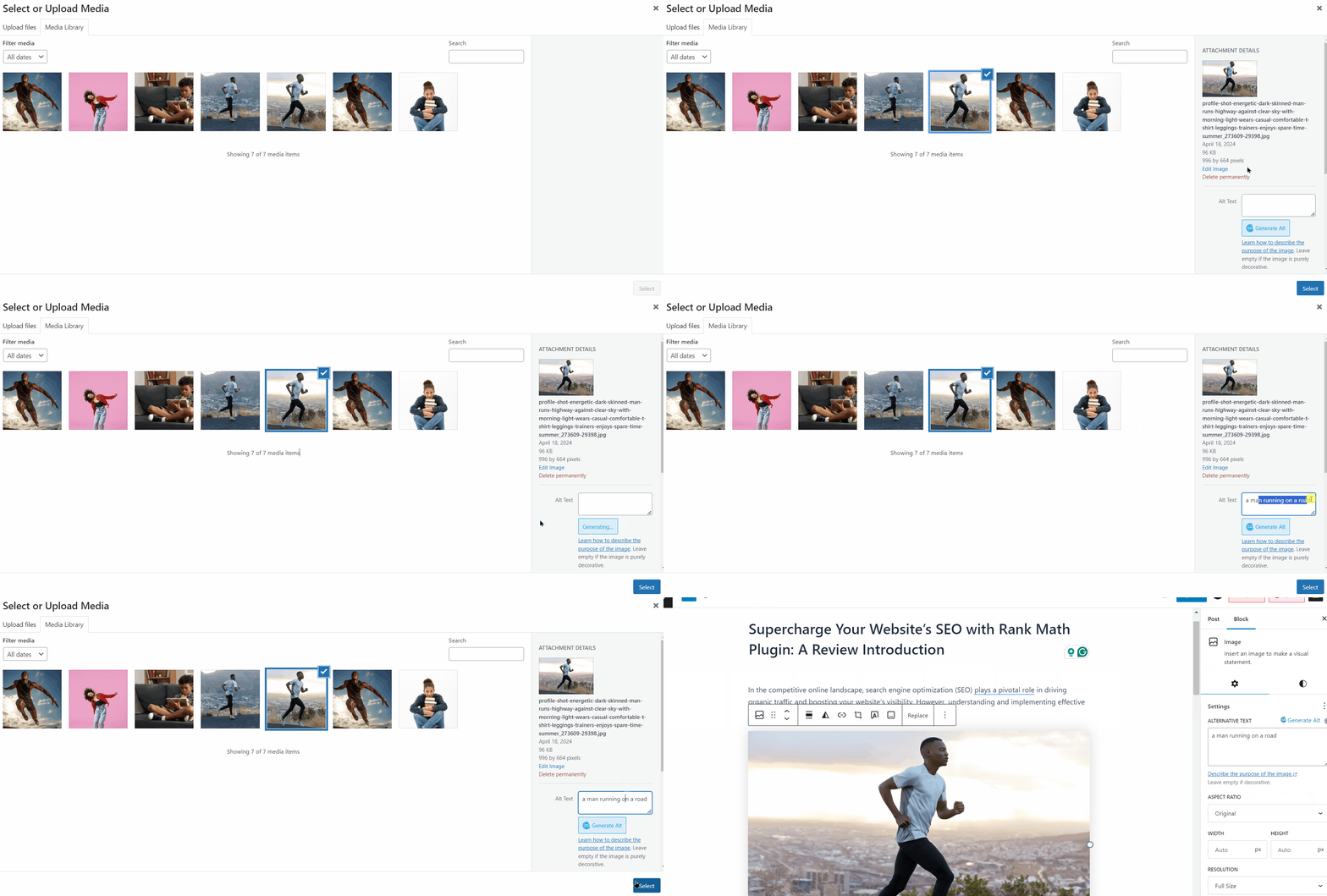
You can also use our Content AI to generate alt text for your images in WordPress. When you upload an image to your Media Library, simply click the Generate Alt button next to the Alt Text field, and the AI will generate an alt text for you, as shown below.
Refer to our dedicated tutorial on image SEO to optimize your images for your WordPress site.
4.2 Lazy Loading & Next-Gen Formats
To keep your pages fast, you can turn on lazy loading. This means images load only when someone scrolls near them. If you’ve ever noticed images loading as you move down a page, that’s lazy loading in action.
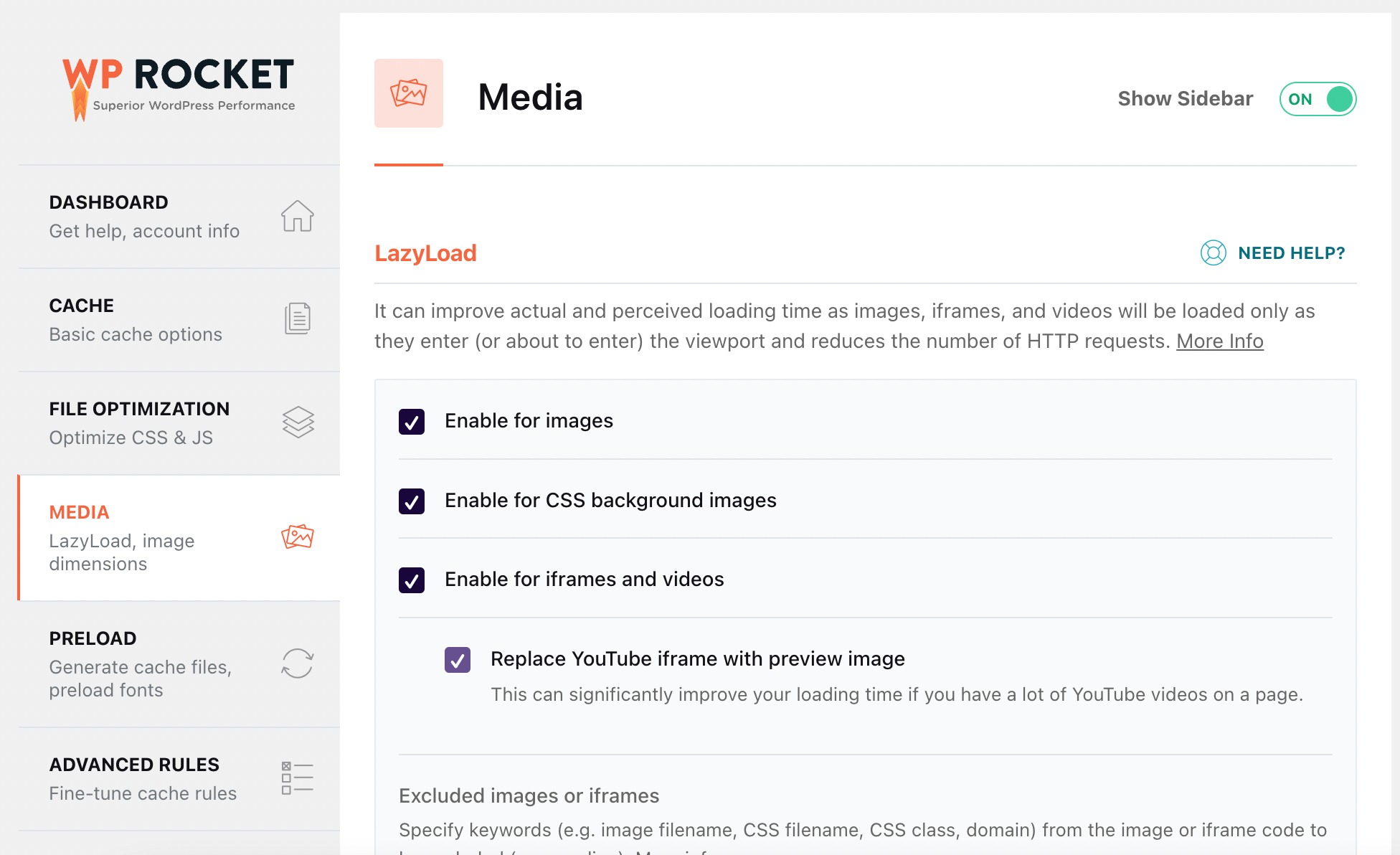
To implement lazy loading, you can use performance plugins like WP Rocket, which applies LazyLoad to images, iframes, and videos.
It’s no surprise that 89% of respondents use a performance optimization tool, with WP Rocket being the top choice, trusted by 56%, as per our survey report.
Next-gen formats like WebP or AVIF help too. WebP files are smaller than JPG or PNG, so your pages open faster. Most modern browsers support WebP, and many WordPress plugins can convert images for you automatically.
4.3 Video SEO
If you use videos on your site, your own or embedded, you can make them easier to find.
One helpful step is adding transcripts or captions. This helps users who prefer reading and also gives search engines more text to understand your video.

You can also add video structured data, which tells Google details like:
- the title of the video
- the description
- the thumbnail
- the upload date
With Rank Math PRO, you can easily & automatically add Video Schema to your existing posts and pages.
To do so, enable the Schema module on your website by navigating to Rank Math SEO → Dashboard → Modules, as shown below.

Next, navigate to Rank Math SEO → Titles & Meta Settings from your WordPress dashboard. Choose the post type for which you want to enable the Autodetect Video option from the list of sections shown on the left.
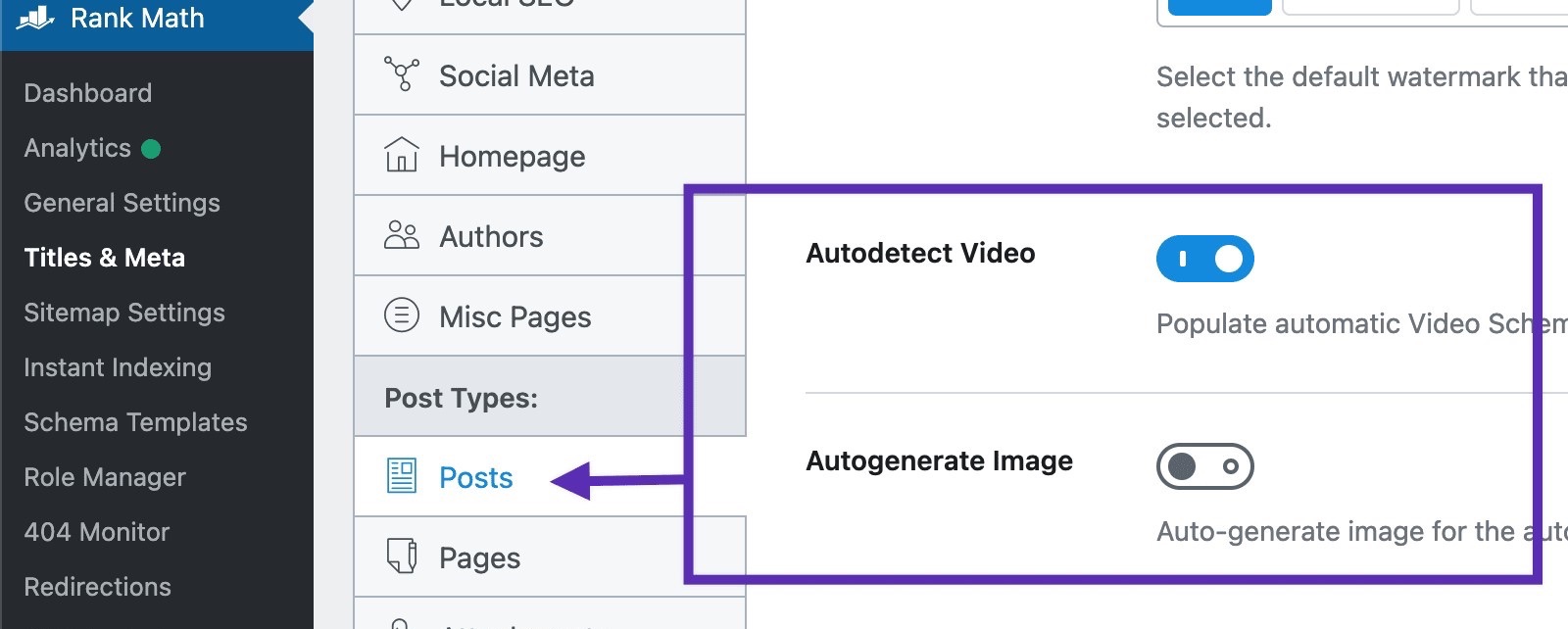
Scroll down the page to find the option to enable Autodetect Video. Once done, save your changes.
5 Off-Page SEO Best Practices
I’ll now discuss off-page SEO practices that you can follow to boost your WordPress site’s visibility.
5.1 Link-building Strategies Specific to WordPress
Off-page SEO primarily involves obtaining links from other websites. These links act like small votes that tell Google your site is useful.
One strategy you can use is guest blogging. For instance, if you run a WordPress blog about cooking, you can write a recipe post for another food blog. In the author bio or inside the article, you link back to your own site. This brings traffic and helps your site’s authority grow.
You can also do simple outreach. If you mention someone’s tool or article in your post, you can email them: Hey, I featured your guide in my article. If you find it helpful, feel free to share it.
While social media doesn’t directly affect rankings, it can help your content reach more visitors, and those visitors may link to you.
Make your posts easy to share.
When you share your content on platforms like Instagram, WhatsApp, or Facebook, you’re basically giving your post more chances to get noticed.
5.3 Local SEO Essentials
If your site targets a specific area, Local SEO helps you show up in nearby searches and the Google Map Pack.
Start by setting up your Google Business Profile with the correct details. Then get local citations on directories like Justdial or Yelp to keep your business info consistent.
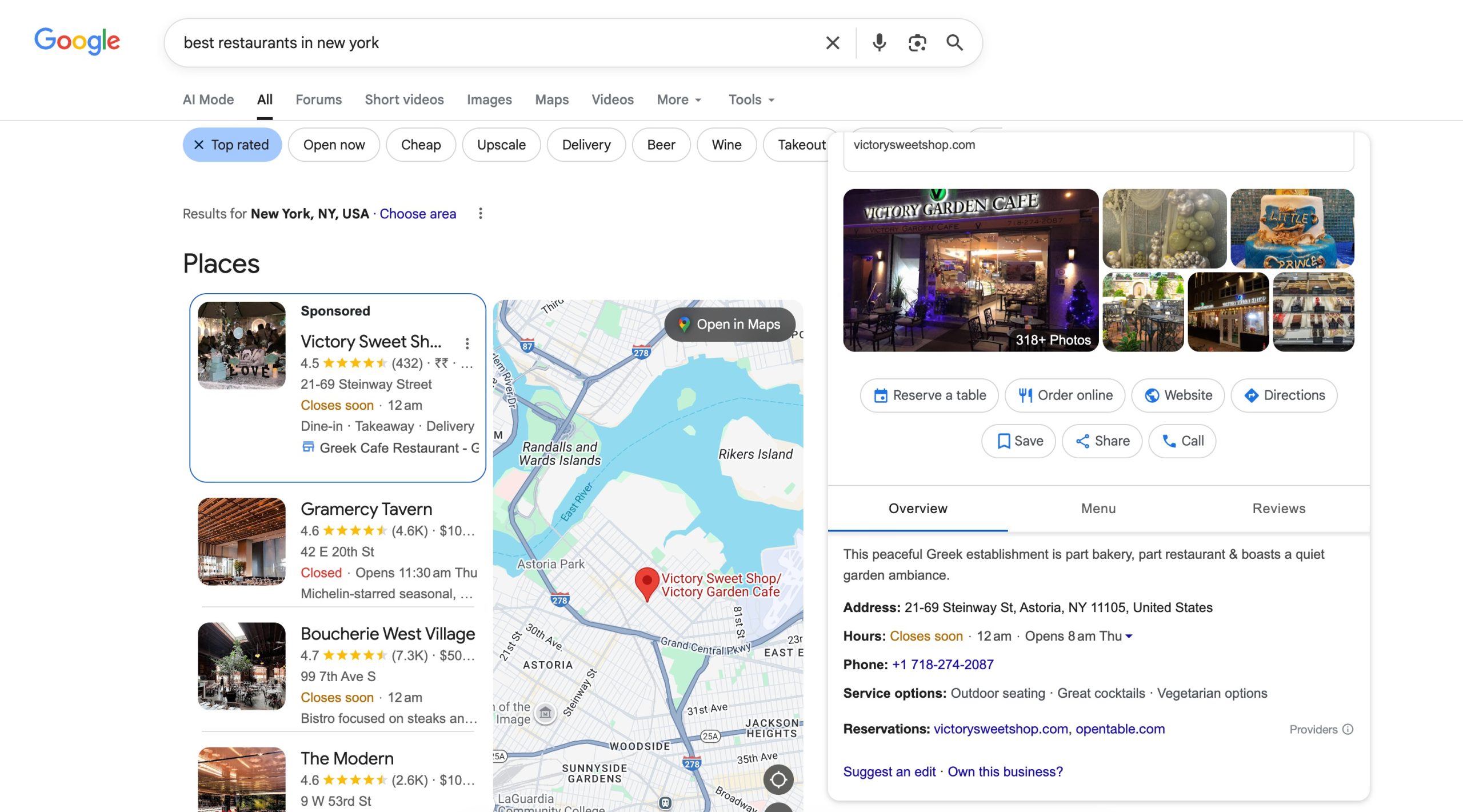
Ask customers for local reviews, since fresh reviews help you rank higher. You can also create content that mentions your city or neighbourhood, for example, Best salons in Bandra. These small steps make it easier for nearby users to find you.
You can use Rank Math to fulfil your Local SEO needs. The Local SEO module helps you optimize your site so you can appear in local search results more easily. You can also add Knowledge Graph data with just a few clicks, giving Google the important details it needs about your website and business.
6 Performance Optimization
Improving the speed of your WordPress site is one of the easiest ways to boost your SEO. When your site loads fast, your visitors stay longer, and search engines see your pages as more reliable.
6.1 Caching and Minification
Caching helps your pages load faster by storing a ready-made version of your site. If you want something simple and powerful, WP Rocket is one of the best options.
It enables page caching, browser caching, and database optimization automatically; you don’t need to touch complicated settings.
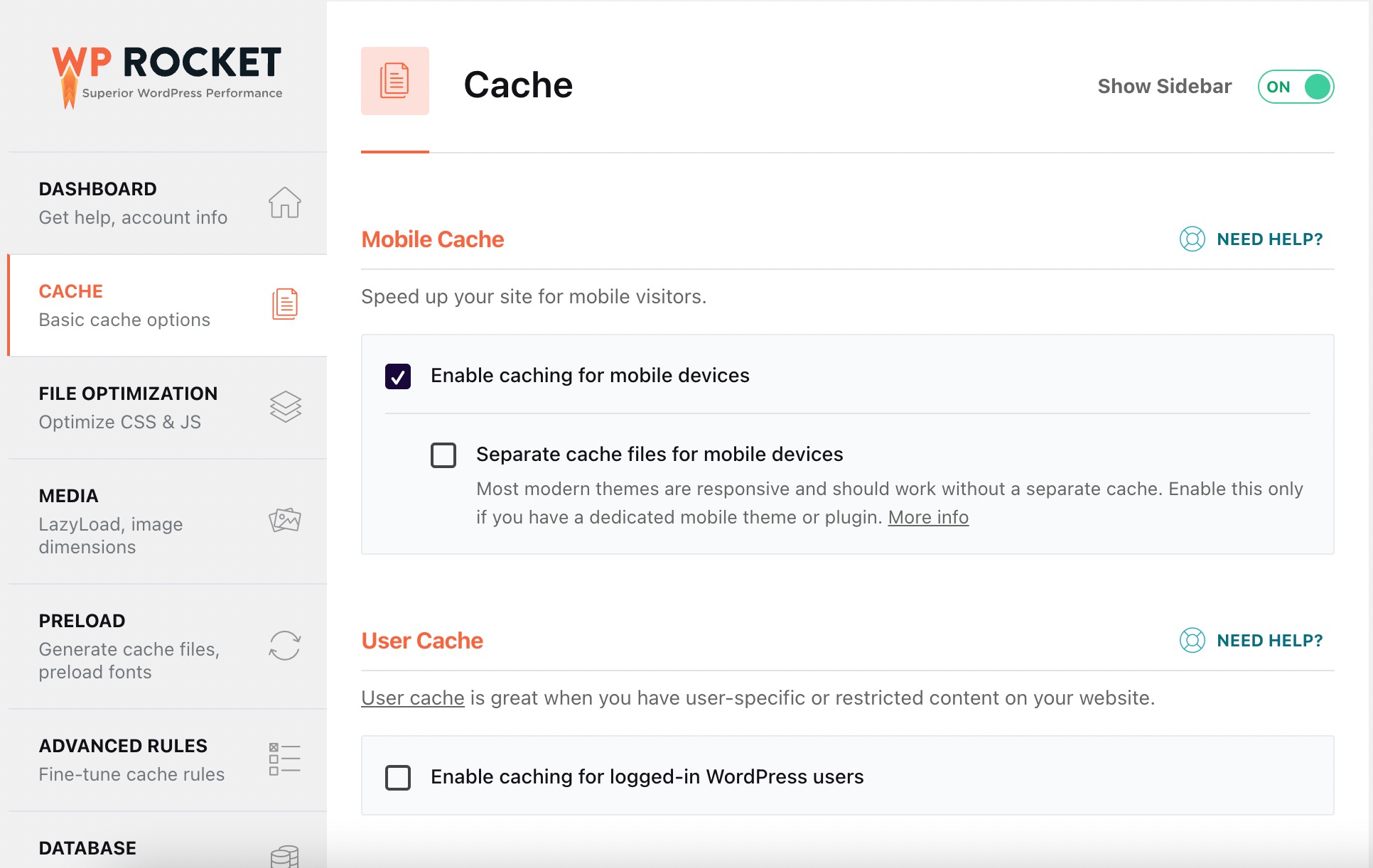
WP Rocket also handles minification, which means it reduces the size of your CSS, JavaScript, and HTML files by removing unnecessary characters.
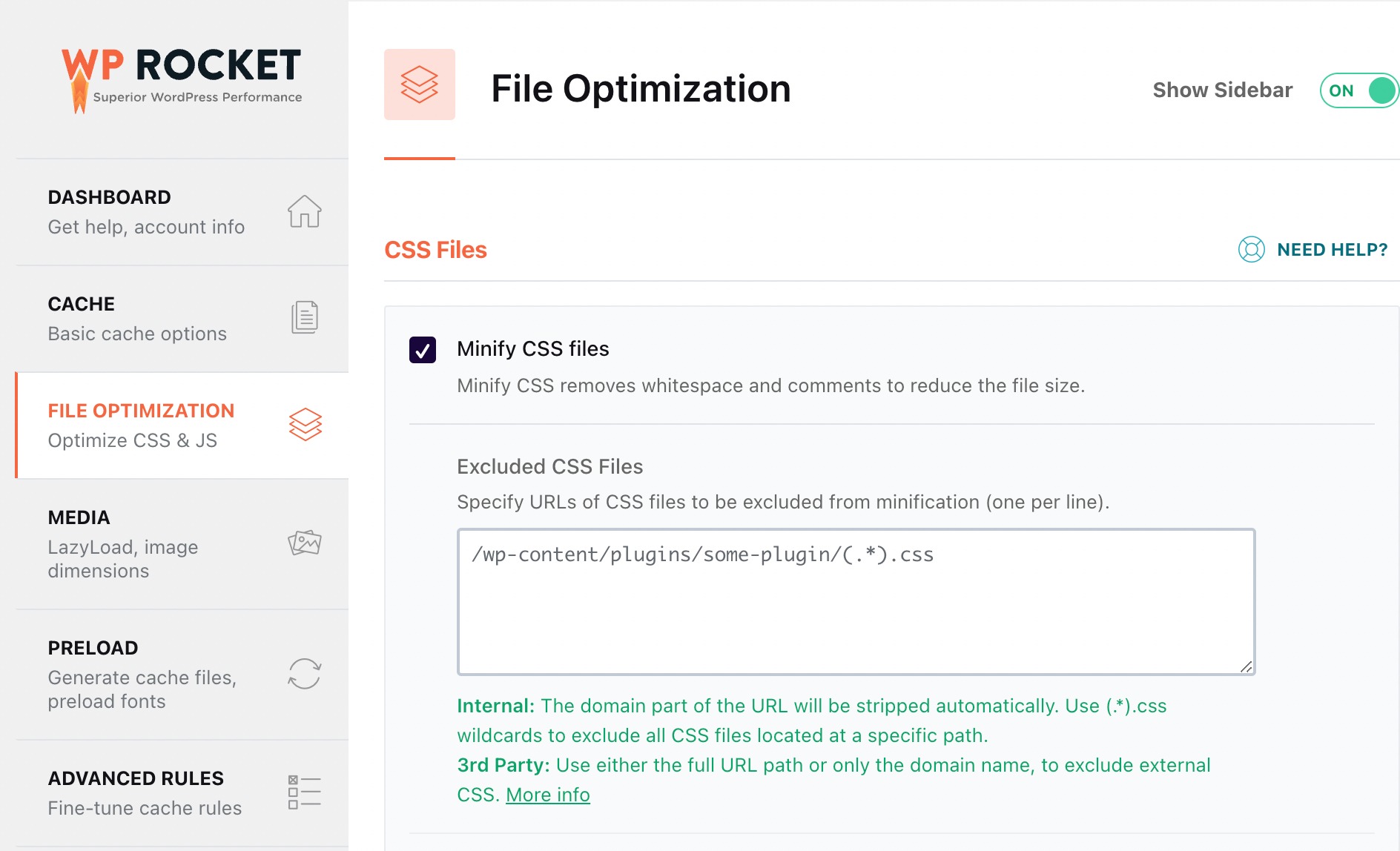
Smaller files load faster and make your site feel smoother. You can also use a free online tool like Minify.
6.2 Content Delivery Network (CDN)
A CDN delivers your site’s images and files from a server closest to each visitor. If your website is hosted in India and someone visits from London, a CDN will load your images from a UK server. This reduces loading time and improves the user experience.
You can consider using popular CDNs such as Cloudflare. I also recommend using RocketCDN, which is a premium CDN that integrates directly with WP Rocket.
6.3 Database Optimization
WordPress stores a lot of extra data you don’t actually need, old post drafts, auto-saved revisions, spam comments, temporary data, and more. This can slow your site down.
WP Rocket comes with a built-in database cleanup tool, so you can remove unwanted data with one click.
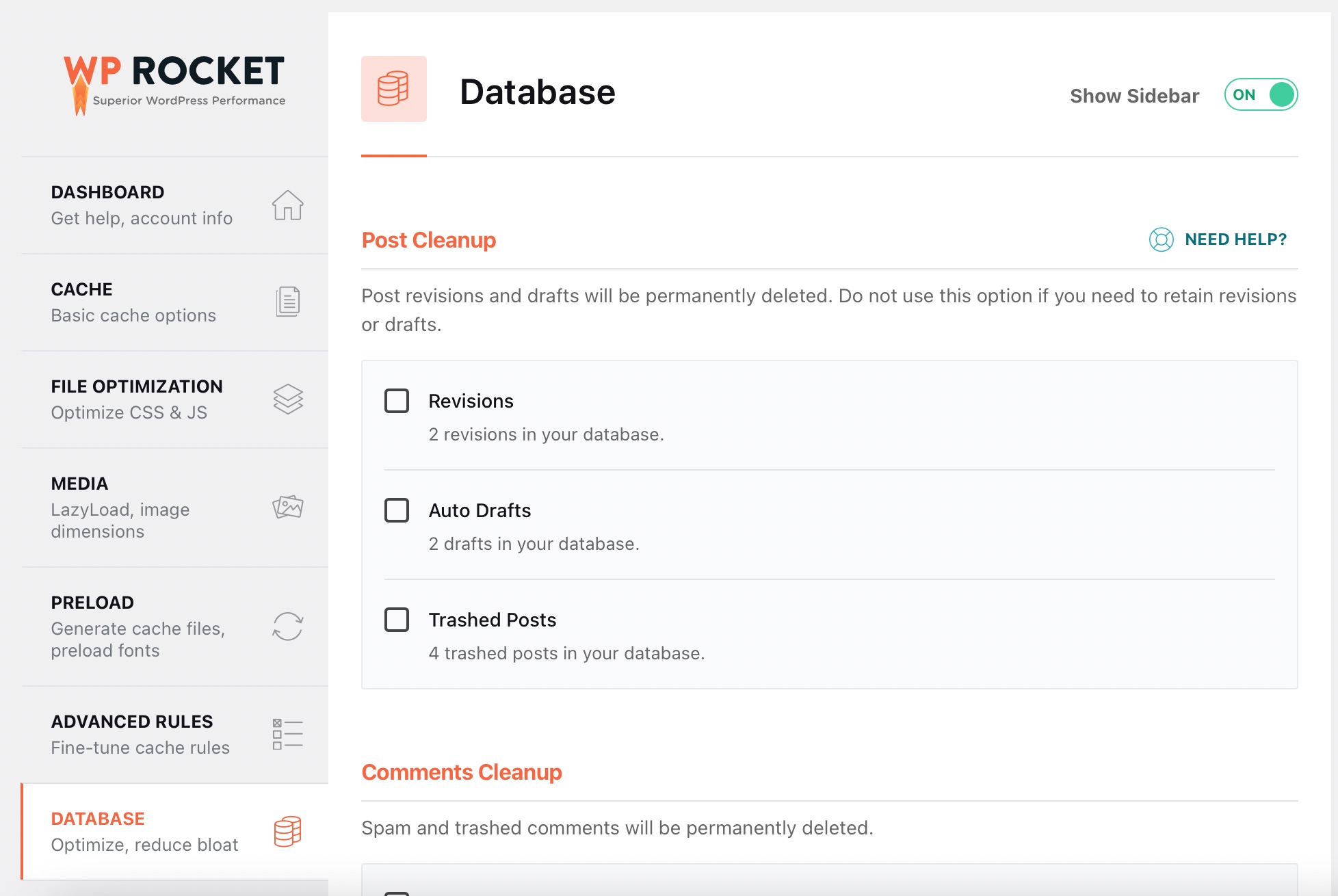
Doing this once a month is usually enough.
6.4 Mobile Optimization
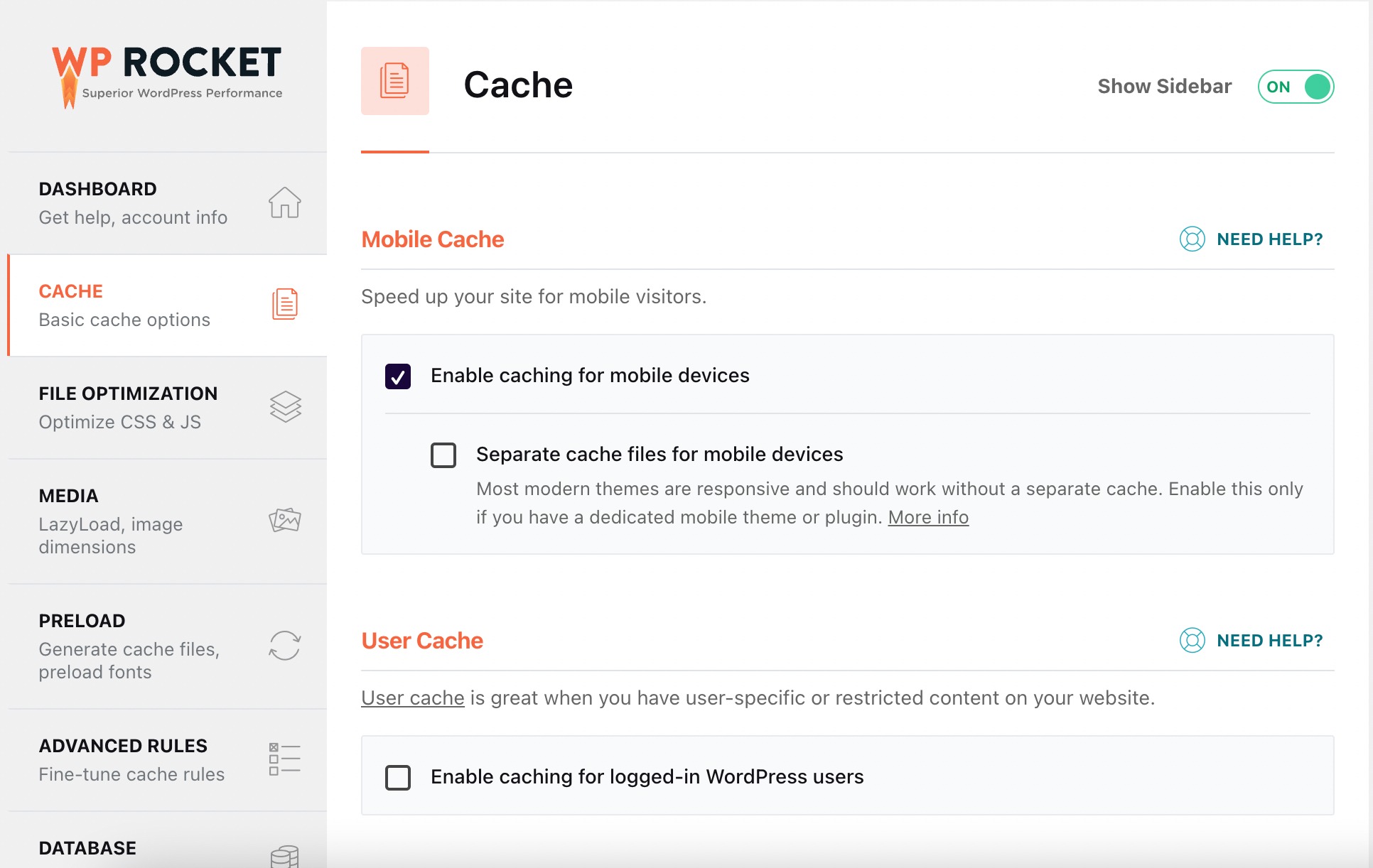
Since Google uses mobile-first indexing, your mobile version plays a bigger role in rankings than your desktop version. This means easy-to-tap buttons, readable text, and fast loading times matter a lot.
WP Rocket also improves mobile speed with features like mobile caching and optimized file loading.
7 Monitoring & Maintenance
Keeping track of your site’s performance helps you understand what’s working and what needs improvement. If you want long-term SEO growth, you should regularly check your data, update your content, and keep your site secure.
7.1 Google Search Console & Google Analytics Setup
Google Search Console and Google Analytics are two tools you should set up right away.
You can add them manually or through a plugin that offers easy verification.
- Search Console helps you see how your pages appear in Google, what keywords you rank for, and whether Google can crawl your site properly.
- Analytics shows how visitors use your site, which pages they read, how long they stay, and where they come from.
You can easily set up your Google accounts with Rank Math and track the performance of your WordPress site.
7.2 Regular SEO Audits
Think of SEO audits as a health check for your website.
- Do a technical audit after major updates to plugins or themes to make sure nothing broke your site structure, schema, or speed.
- Do a content audit every few months to refresh old posts, remove outdated sections, and improve articles that aren’t ranking.
7.3 Security & SEO Longevity
A hacked website or frequent downtime can hurt your SEO more than anything else. That’s why keeping your site secure is part of good SEO.
You should:
- Keep WordPress, themes, and plugins updated
- Use a firewall
- Turn on two-factor authentication
- Take regular backups
For example, if your site ever gets infected with malware, you may drop out of Google search until it’s fixed. Backups and security tools protect the SEO work you’ve already done.
8 Conclusion
When you follow the right steps, WordPress SEO becomes much easier than it looks. You don’t need to do everything at once, just focus on building a fast site, creating helpful content, and keeping your setup clean and secure.
If you stay consistent, update your content regularly, and monitor your performance, your WordPress site will continue to grow for years.
You’re not just optimizing for today, you’re building a strong foundation for the future. If you have absolutely any questions or want to join the conversation, tweet @rankmathseo! 💬